Google Ad Grants for global charities
The Complete Guide to $10,000 of Free Monthly Search Ads
Introduction
If your charity has ever stared at a Google Ads invoice and wondered how the bigger names manage to bid on every donation keyword going, here’s a quiet truth most don’t shout about. Many of them aren’t paying for those clicks at all.
They’re using Google Ad Grants. So can you.
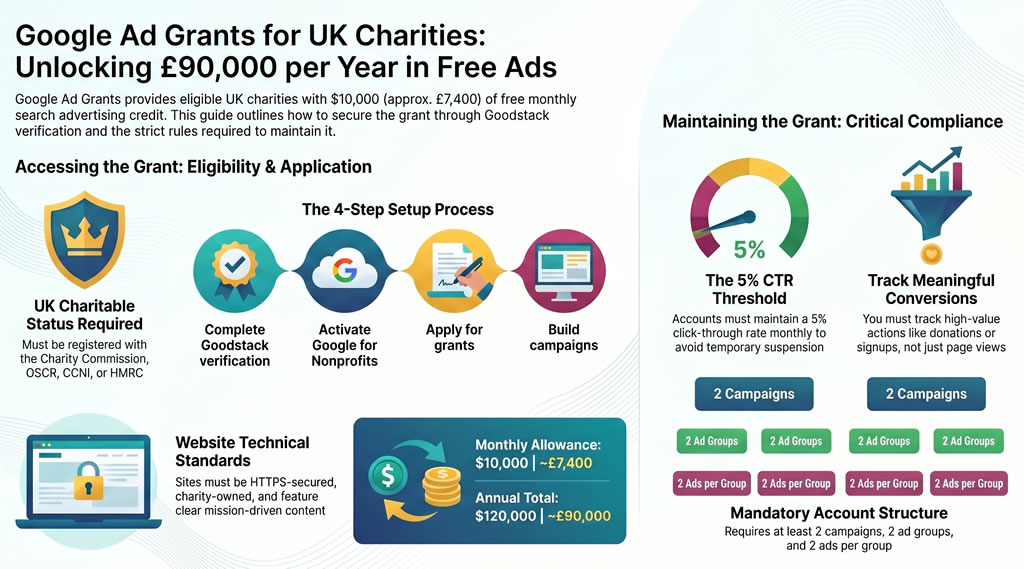
This is Google’s longest-running gift to the non-profit sector. It hands eligible charities up to $10,000 a month in free Google Search advertising. That works out to roughly £7,400 a month or close to £90,000 a year, depending on the exchange rate. And you can keep receiving it for as long as your charity stays eligible.
In this guide, we walk through what the grant actually is, who qualifies in the UK, how to apply through the latest verification process, and the rules you’ll need to follow once you’re in. We’ve also added a list of other free programmes that complement the grant nicely, so your digital budget can stretch further than you might think.
What Is Google Ad Grants?
Google Ad Grants sits inside the wider Google for Non-profits programme, which launched back in 2003. Since then, Google has handed out more than $10 billion in free ad credits to over 115,000 charities across more than 50 countries.
The idea is simple. Google gives your charity a $10,000 monthly Google Ads budget. You spend it on text-based search ads that appear on Google.com when people type in keywords related to your cause.
If someone searches for “support refugees in the UK” and your ad shows up, they click, land on your donation page, and (hopefully) give. The cost of that click gets deducted from your monthly $10,000 allowance instead of from your bank account.
The credit resets every month. It’s not a one-off. As long as you stay compliant, it keeps coming.
A few quick numbers worth keeping in your back pocket:
- $10,000 USD per month, roughly £7,400 to £7,500
- $120,000 USD per year, roughly £90,000
- Available in over 50 countries, including the UK
- More than 35,000 charities actively use it today
Why This Matters for Your Charity
Most charities work with marketing budgets that would make a corporate brand laugh. Google Ad Grants quietly shifts that balance.
When someone searches for “donate to children’s hospital” or “Zakat calculator UK” or “homeless charity Manchester”, your charity gets the chance to show up at the top of the page, for free.
That visibility translates into a lot more than donations. UK charities use the grant to:
- Drive donations and recurring giving sign-ups
- Recruit volunteers
- Promote events and campaigns
- Get sign-ups for email newsletters
- Educate the public about specific issues
- Connect people with services they need
Shelter, WWF, Cancer Research UK and thousands of smaller UK charities use the programme. So can yours.
Who Can Apply: UK Eligibility Rules
To qualify in the UK, your organisation must hold a valid charitable status. That means being registered with one of the following:
- The Charity Commission for England and Wales
- OSCR (Office of the Scottish Charity Regulator) for Scotland
- The Charity Commission for Northern Ireland (CCNI)
- HMRC, if you’re an exempt charity, masjid or church recognised for charitable tax purposes
You’ll also need to meet Google’s wider rules:
- Agree to Google’s certifications regarding non-discrimination and how donations are used
- Have a website you own that clearly explains your charity, mission and activities
- Make sure your site is secured with HTTPS (the lock symbol in the browser)
- Drive users to take a meaningful action on your site (donate, subscribe, contact, volunteer)
If you’re a Community Interest Company (CIC) rather than a registered charity, you sadly aren’t eligible. You’d need to set up a separate charitable entity to access the programme.
Who Cannot Apply
Even if you’re a charity, the following types of organisation are excluded:
- Government entities and departments
- Hospitals and healthcare organisations (though their fundraising arms can apply)
- Schools, colleges and universities (though their philanthropic foundations can apply)
If you’re an NHS Foundation Trust, for example, the hospital itself isn’t eligible, but the linked charity foundation usually is.
How to Apply: A Step-by-Step Process
The application process has changed in the past couple of years. Google now uses a verification partner called Goodstack (formerly known as Per cent) to confirm your charity’s status. Here’s how the process flows in 2026.
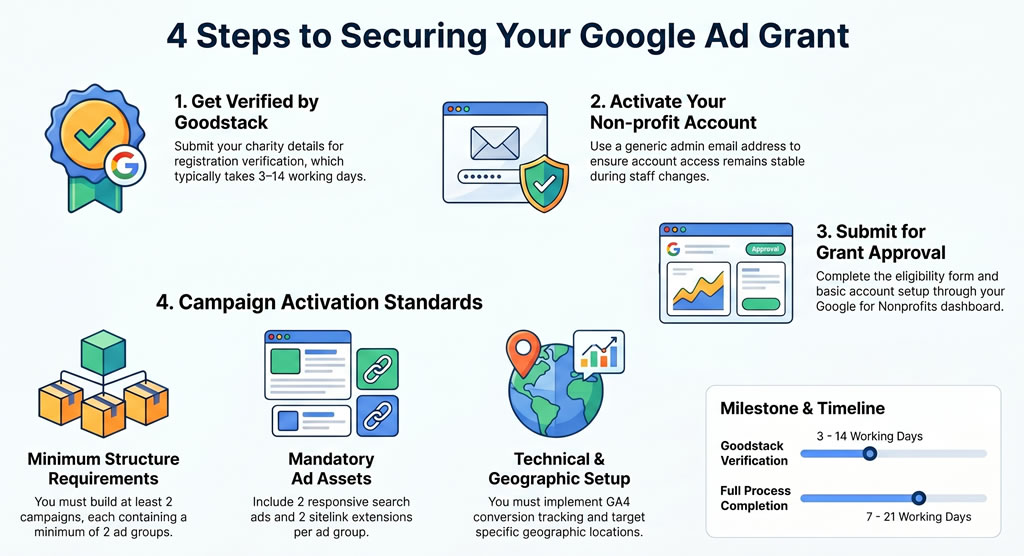
Step 1: Get Verified by Goodstack
Visit google.com/nonprofits and click “Get started” in the top right. You’ll be asked for your charity details. Goodstack will then verify your registration with the relevant UK regulator.
This usually takes between 3 and 14 working days. Watch your spam folder for emails from verifications@mail.goodstack.org. They’ll often ask for supporting documents.
Step 2: Activate Your Google for Nonprofits Account
Once Goodstack confirms you, you’ll receive an email letting you set up your Google for Nonprofits account. Use a generic admin email like marketing@yourcharity.org rather than a personal one. Staff change. Email logins should not.
This account also unlocks other freebies like Google Workspace for Nonprofits and the YouTube Nonprofit Programme, which we’ll come back to.
Step 3: Apply for Google Ad Grants
Inside your Google for Nonprofits dashboard, find the Google Ad Grants section and click “Get started”. You’ll be taken through an eligibility form, asked to set up a basic Google Ads account, and then submit it for approval. The official help page is here.
Step 4: Build Your First Campaign
Once approved, you’ll need to set up your first campaigns properly to activate the grant. Standard requirements include:
- At least 2 campaigns
- At least 2 ad groups per campaign
- At least 2 responsive search ads per ad group
- At least 2 sitelink extensions
- Conversion tracking via Google Analytics 4 or Google Tag Manager
- Geographic targeting (your ads must target a specific location, not “anywhere”)
The full process from start to active grant typically takes between 7 and 21 working days, assuming everything’s in order.
You can find Google’s official eligibility page here.
The Compliance Rules You Must Follow
Here’s where most charities trip up. Getting the grant is one thing. Keeping it is another.
Google has tightened the rules considerably since 2018. The programme now functions less like “free money” and more like a managed account that you have to actually run properly. The key rules are below.
The 5% CTR Rule
Your account must maintain a click-through rate of 5% or higher every month. If your CTR drops below 5% for two consecutive months, your account gets temporarily suspended.
For context, the average paid Google Ads account in the nonprofit sector hovers around 4.4%. The grant requires you to do better than the paid average. That trips a lot of charities up.
Keyword Quality Rules
You cannot run keywords with a Quality Score of 1 or 2. You also can’t bid on:
- Single-word keywords (with limited exceptions for branded terms and medical conditions)
- Overly generic keywords like “today’s news” or “free videos”
- Branded keywords you don’t own (you can’t bid on “BBC” or “Cancer Research UK” if you’re not them)
Conversion Tracking
Every account opened since January 2018 must have valid conversion tracking and record at least one meaningful conversion per month. A “meaningful” conversion is something tied to your mission. A donation, an email signup, a volunteer registration, a petition signed. A page view doesn’t count.
Account Structure Rules
Your account must have:
- Geographic targeting set
- At least 2 ad groups in each campaign
- At least 2 ads per ad group
- At least 2 sitelink extensions per campaign
Smart Bidding for Newer Accounts
Accounts created since April 2019 must use a conversion-based smart bidding strategy (Maximise Conversions, Target CPA, Target ROAS). Manual CPC is no longer the default route.
Ongoing Activity
You must log in at least once a month and make changes at least every 90 days. You also need to respond to Google’s annual programme survey when it lands in your inbox.
For the full official policy, Google maintains its compliance guide here.
The Reality Check: It’s Not Quite “Free Money”
A bit of honesty here. The number you see on every agency landing page is “$10,000 a month”. The number that matters more is what you actually spend.
The average Google Ad Grant account uses just $300 of its $10,000 monthly budget. Most charities never get close to using the full allowance.
Why? A handful of common reasons:
- The 5% CTR rule chokes off low-quality keywords fast
- Many charities target tiny geographic areas with low search volume
- Thin website content limits the number of relevant keywords you can target
- Smart bidding is set up incorrectly and limits impressions
- Nobody manages the account, so it slowly decays
The flip side is also true. Charities that take the grant seriously regularly hit $8,000 to $9,500 in monthly spend, every month. That’s a real, ongoing source of relevant traffic to donation and signup pages.
So the right way to think about Ad Grants is this. It’s a free advertising channel that needs proper management to deliver real results. Treat it like a budget you have to earn back, and it pays you handsomely. Treat it like a switch you flip and forget, and it’ll either underperform or get suspended.
How Google Ad Grants Pair with Affiliate Marketing
Quick angle here from our own experience at AMCM. Google Ad Grants is brilliant for capturing people who already know what they want. Someone searching “donate to homeless shelter London” is what we call high intent traffic. They’re warm. They convert.
But not everyone searches with that intent. Many of your future donors don’t know your charity exists yet. That’s where affiliate marketing earns its place. Affiliates, content publishers, cashback sites and influencers introduce you to people who weren’t actively looking for your cause but are open to giving once they discover it.
Used together, the two channels build a complete funnel. Ad Grants brings in the people actively searching. Affiliates bring in the people who would never have found you on their own. Both pay off when your donation page is set up to convert.
If you’d like to talk about how affiliate marketing can complement your Google Ad Grants performance, we’re happy to chat.
Bonus: Other Free Tools and Programmes for Charities
Google Ad Grants gets the headlines, but it’s just one piece of the free tech ecosystem available to UK charities. Here are the other programmes worth applying for. Most use the same Goodstack or TechSoup verification, so once you’re in one, others become a lot quicker.
| Programme | What You Get | Where to Apply |
|---|---|---|
| Google Workspace for Nonprofits | Free Gmail, Drive, Docs, Calendar and Meet for your team | google.com/nonprofits |
| YouTube Nonprofit Programme | Donation cards, link annotations, production tools | youtube.com/nonprofits |
| Microsoft for Nonprofits | Discounted Microsoft 365, Teams and Azure cloud credits | nonprofit.microsoft.com |
| Canva for Nonprofits | Free Canva Pro for up to 50 users | canva.com/canva-for-nonprofits |
| Adobe Express Premium for Nonprofits | Free Adobe Express Premium for design and content | adobe.com/express/pricing/nonprofit |
| Meta Donation Tools | Free Donate buttons on Facebook and Instagram, fundraiser features | socialimpact.facebook.com |
| TikTok for Good | Donation Stickers, in-app fundraising, and creator partnerships | tiktok.com/forgood |
| LinkedIn for Nonprofits | Discounted Recruiter, Sales Navigator and Learning licences | nonprofit.linkedin.com |
| AWS Nonprofit Credit Programme | Up to $2,000 in AWS credits per year for hosting and cloud | aws.amazon.com/nonprofits |
| AWS Imagine Grants | Up to $150,000 unrestricted plus AWS credits for cloud and AI projects | aws.amazon.com/imagine-grant |
| Salesforce Power of Us | Up to 10 free Salesforce Nonprofit Cloud licences | salesforce.org/power-of-us |
| HubSpot for Nonprofits | 40% discount on Marketing, Sales and Service Hubs | hubspot.com/nonprofits |
| Zoom for Nonprofits | Up to 50% off Pro and Business plans | explore.zoom.us/en/nonprofit |
| Slack for Nonprofits | Free or discounted Pro plans for charity teams | slack.com (nonprofit help) |
| Mailchimp for Nonprofits | 15% discount on paid plans | mailchimp.com/nonprofit-discount |
| TechSoup UK | The UK’s main hub for discounted and donated tech | techsoup.org |
| Charity Digital | UK-focused tech, training and donated software | charitydigital.org.uk |
| Goodstack | The verification platform Google uses also opens partner discounts | goodstack.io |
A quick note on Microsoft. Microsoft Advertising’s “Ads for Social Impact” programme, which used to offer up to $3,000 a month in free Bing ads, ended in late 2025. Existing recipients had until early 2026 to use their final credits. Microsoft has hinted at relaunching a new version, but at the time of writing, no application portal has reopened. Worth keeping an eye on.
Don’t sleep on Charity Digital and TechSoup UK either. These are the UK gateways to the most donated and discounted software in the list above. Once you’re verified through them, applying for individual products becomes a lot quicker.
Download the PDF Presentation or watch a short YouTube Video on this topic.
Final Thoughts
Google Ad Grants is one of the most generous offers any tech company makes to the charity sector. The fact that so many eligible UK charities still aren’t using it (or are using it badly) is a missed opportunity worth fixing.
A realistic action plan looks something like this:
- Apply this month. Verification takes a couple of weeks, so don’t put it off.
- Get the basics right. Conversion tracking, two ads per group, sitelinks, the lot.
- Pick four or five themes you want to be found for and build campaigns around them.
- Review monthly. Pause low CTR keywords. Add high-performing search terms.
- Pair it with other channels (affiliate, email, social, content) so the traffic you earn for free turns into long-term supporters.
If you’d like a hand setting any of this up, or you want to look at how affiliate marketing could sit alongside your Google Ad Grants strategy to multiply the impact, drop us a message. We’re a small UK team that lives and breathes charity fundraising. Always happy to talk.
Disclaimer – AMCM Agency manages affiliate marketing campaigns for charities and nonprofits worldwide. We don’t manage Google Ad Grants directly, but we’re happy to point you toward trusted partners who do.