Digital Marketing Guide for Small Charities (UK Edition)
Practical Tools, Strategies, and Examples to Help Charities Grow Online With Confidence and Purpose.
Introduction
Digital marketing might sound daunting, especially for small charities with limited staff and budget. However, it simply means using online channels to spread the word about your cause and engage supporters. For charities working in humanitarian aid, disaster relief, food distribution, health services, or Islamic causes, a strong digital presence can dramatically increase your reach and impact.
This guide breaks down the essentials of non-profit digital marketing into clear, easy steps. It focuses on practical actions that small UK charities can take, with minimal cost, to boost their fundraising and community engagement online. We’ll cover how to plan a strategy, which digital channels to use, tips for creating effective content, and free or affordable tools to make it all manageable. By the end, you should feel confident about promoting your charity’s mission online – even if you don’t have dedicated marketing staff.
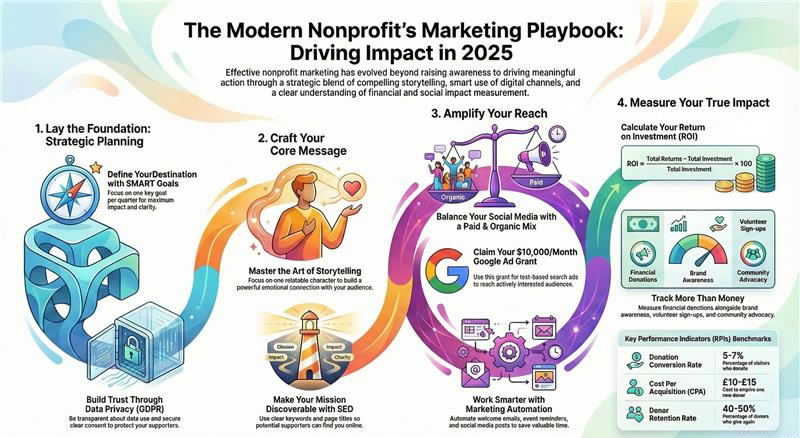
Key Points Overview
- What is Digital Marketing? It means using online methods (website, email, social media, etc.) to promote your charity’s mission. The goal is to make your organisation and its cause known to the public so you can attract volunteers, donors, and supporters. Digital marketing isn’t just one thing – it spans multiple channels (from search engines to social media) that work together. There are two main approaches:
- Organic reach (free): e.g. improving your website’s visibility on Google and engaging with people on social media.
- Paid advertising: e.g. using Google or Facebook Ads to target specific audiences for your campaigns.
- Why It Matters – Traditional methods (like flyers or postal appeals) only go so far. Digital marketing helps you reach more donors beyond your local area, targeting people who are actually interested in your cause. It offers convenience – people can find and support you online from the comfort of their home. It can also be cost-effective: with a good digital strategy, you spend less on printing and mailing, saving money and time. In short, digital outreach can amplify your impact without breaking the bank.
- Planning is Key – Don’t wing it. A simple digital marketing plan will keep your efforts consistent and effective. Set clear goals for what you want to achieve (e.g. increase online donations by 20% this year). Identify your target audience and what online platforms they use most. Create a content calendar so you post regularly. And decide how you’ll measure success (such as tracking website visits or email sign-ups). We’ll walk through a step-by-step process to build a basic strategy.
- Core Digital Channels – Focus on a few channels that work best for your charity:
- Email Marketing: Great for directly updating supporters and making appeals.
- Social Media: To build community and share stories (e.g. Facebook, Instagram, X/Twitter, LinkedIn).
- Messaging: SMS or WhatsApp to reach people instantly (texts have extremely high open rates, around 98%, meaning almost everyone reads them).
- Content Marketing: Creating blog posts, videos, or infographics that educate people about your cause and show your impact.
- Website & SEO: Your website is your digital home base – it should be user-friendly and show up on search engines so people can find you.
- Online Events: Live webinars, Facebook/YouTube Live sessions, or virtual fundraisers can engage supporters anywhere in the world.
- Digital Advertising: If you have some budget (or grants), targeted ads on Google or social media can quickly boost your visibility.
- Best Practices – Be consistent and authentic. Automate where possible (schedule posts, set up email auto-responders) to save time. Segment your audience and personalise communications (e.g. volunteers vs. donors) for better engagement. Keep your branding (logo, tone, messages) uniform across channels to build trust. Pay attention to search engine optimisation (SEO) so that people searching for causes like yours find you. And don’t go it alone – partner with other organisations or influencers to extend your reach. Above all, stay true to your charity’s core mission: let your values guide every digital campaign.
In the sections below, we break down each major aspect of digital marketing for small charities. Each section also suggests free or low-cost tools and platforms to help you implement these ideas.
Understanding Digital Marketing for Small Charities
What is Digital Marketing? For non-profits, digital marketing is simply using online channels to spread the word about your work. It’s everything from your charity’s website and email newsletters to social media posts, online petitions, and paid ads. The aim is to make your mission known so you can find new supporters and keep existing ones engaged. One common misconception is thinking digital marketing is just sending an occasional email or posting on Facebook.
In reality, effective digital marketing is multi-faceted and consistent. It’s about creating a steady online presence through various methods that reinforce each other. For example, if you publish a success story on your website’s blog, you would then share that story via email and social media for maximum reach. Organic vs. Paid Reach: There are two main ways to reach people online:
- Organic reach – This is free visibility you earn by creating good content. For instance, a well-optimised website will rank higher on Google search results, and an active social media page will attract followers naturally. If someone searches for a cause you work on (say “homeless shelter Manchester”), you want your organisation to appear prominently in the results. Achieving this involves tactics like search engine optimisation (SEO) and regular engagement on platforms like Facebook or Instagram. The benefit: organic marketing builds trust and community over time at little to no cost.
- Paid advertising – This involves spending money on targeted ads to reach specific audiences. Common options are Google Ads (which can put your website at the top of search results for certain keywords) and social media ads (e.g. promoting your posts to users likely to be interested). Paid ads can produce quick results and help you reach people beyond your existing followers. The good news for non-profits is that Google offers an Ad Grant programme that gives eligible charities free advertising credit (up to $10,000 per month on Google Search ads) – more on that later. Paid advertising should complement, not replace, your organic efforts, especially when budgets are tight.
Why Digital Marketing is Crucial: Small charities often rely heavily on local networks and word of mouth. By going digital, you expand your reach nationally and even globally. Someone in Birmingham or even abroad who cares about your cause can discover your charity online and contribute, whereas they’d never hear of you otherwise. Digital channels also allow you to target niche communities – for example, if you work on disaster relief, you can target people who have shown interest in emergency aid causes. Digital marketing also meets supporters where they are. More and more people (of all ages) prefer to interact online – whether that’s reading news on their phone, watching charity appeals on YouTube, or donating through a website. If your charity isn’t visible online, you risk missing out on a huge audience of potential donors and volunteers who expect to find information and give support digitally.
Finally, online marketing tends to be cheaper and easier to scale than traditional marketing. Sending a mass email costs next to nothing (and can reach thousands), whereas printing and posting letters or flyers can be expensive and labour-intensive. Social media posts and live videos are free to create and distribute, unlike physical events or brochures. Especially for charities with limited funds, digital marketing provides a high return on investment by cutting down material costs and allowing small teams to manage outreach through free tools.
Tools & Platforms for Getting Started
Even if you’re new to digital marketing, there are many free or affordable resources designed for non-profits:
- Google for non-profits – A program offering free access to Google’s suite of tools. This includes Gmail and Google Workspace (for professional email and collaboration), YouTube non-profit features (like a donate button on your videos), and Google Ad Grants. The Google Ad Grants give eligible charities $10,000 per month of free advertising credit on Google Search ads – a huge boost to get your message out. (Eligibility requires your charity to be registered and validated via TechSoup; most UK charities can qualify.)
- Charity Digital Exchange (TechSoup UK) – A service that provides charities with software donations and discounts. Through this, you can get products like Microsoft 365, Norton Security, or Adobe Creative Cloud at either free or vastly reduced rates. For example, Microsoft 365 Business Basic is free for up to 300 users for eligible non-profits, giving you professional email (yourname@yourcharity.org) and cloud storage at no cost. Similarly, Canva Pro (the premium graphic design tool) is free for registered non-profits.. This exchange is a gateway to many such offers – it’s worth registering your charity on TechSoup and browsing available deals.
- non-profit Learning Hub (Online Training) – There are free learning resources to help you skill up. For instance, non-profit Ready is a platform offering free courses on fundraising, marketing, and more. Similarly, CharityHowTo and TechSoup hold free webinars on topics like “social media for charities” or “email marketing basics”. Dedicating a few hours to these can empower you to run digital campaigns effectively on your own.
- WildApricot (Membership Management) – WildApricot is an all-in-one platform popular with small non-profits. It lets you build a basic website, manage a contact database, send emails, take online donations, and run event registrations in one place. They offer a free 60-day trial and inexpensive plans for small contact lists (under 100 contacts). It could be a useful starter solution if you prefer one integrated tool for most digital tasks, especially membership-based charities or community groups.
- Social Media & Content Apps – Get comfortable with a few free apps that make digital outreach easier:
- Meta Business Suite: A free dashboard from Facebook that allows you to schedule and post to Facebook and Instagram, read messages, and view basic insights all in one place.
- Canva: As mentioned, the free version (or free non-profit Pro) lets you design polished graphics, flyers, social media images, and even short videos without any graphic design skills.
- Unsplash/Pexels: Free stock photo libraries. When you need quality images for a post or brochure and don’t have your own, these sites provide royalty-free photos (including many on humanitarian themes).
- Bit.ly: A free link shortener and tracker. If you’re sharing a long donation URL, Bit.ly can shorten it (e.g. bit.ly/charityname) and track how many people click it – useful for gauging campaign interest.
- WhatsApp Business: A free app if you have a number to dedicate to your charity. It lets you create a profile for your organisation on WhatsApp, automate greetings or quick answers, and broadcast messages to lists (with permission). This can be useful for keeping in touch with volunteers or community members via a channel they use daily.
By taking advantage of these tools and programmes, even the smallest charity can build a professional online presence with very little money. The key is to register for non-profit-specific offers (many big tech companies have them) and use free tiers of services until you truly need to upgrade.
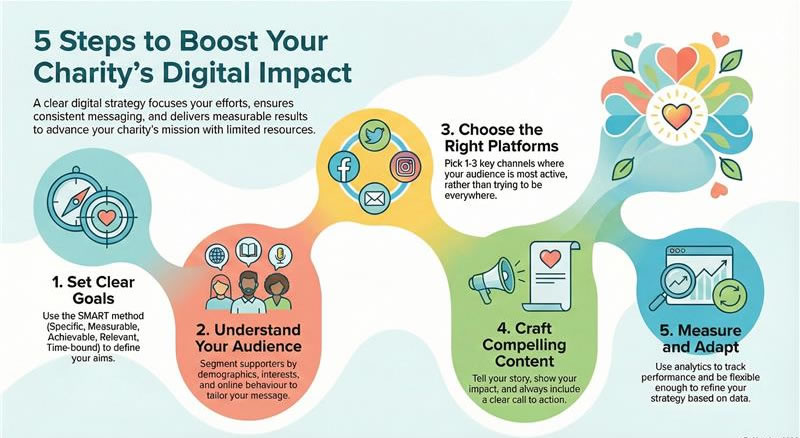
How to Build a Digital Marketing Strategy
Going online without a plan can lead to inconsistent messaging and wasted effort. A simple strategy ensures you use your limited time and resources on what matters most. Here is a step-by-step process to create a basic digital marketing strategy for your charity: 1. Define Your Goals – Start by deciding what you want to achieve. Do you want to raise £5,000 through an online campaign? Recruit 100 new volunteers? Increase awareness about an issue in your community? Be specific. Setting a clear goal focuses your efforts and lets you measure success.
A common method is to use SMART goals – make them Specific, Measurable, Achievable, Relevant, and Time-bound. For example, instead of a vague goal like “get more donors”, a SMART goal could be: “By the end of this year, increase our email subscriber list from 200 to 500 and convert at least 50 of those subscribers into donors.” This goal is specific (subscribers and donors), measurable (numbers are given), achievable (doubling subscribers with effort is realistic), relevant (growing the supporter base should lead to more donations), and time-bound (has a year-end deadline).
Take a moment to write down 1–3 key goals for your digital marketing. Having too many goals can dilute your focus, so prioritise what will most advance your mission or solve your biggest challenges (e.g., if donations are low, a fundraising goal might top the list; if few people know you exist, a visibility goal might come first). 2. Know and Segment Your Audience – Next, think about who you’re trying to reach online. You likely have different groups: perhaps local service users, individual donors, community fundraisers, and maybe institutional funders. Each group might engage differently. Break down (segment) your audience into meaningful categories, then tailor your approach to each. For example:
- Demographics: age, gender, location. (Are you targeting young adults in London, or retirees across the UK? Parents? Students?)
- Interests/Values: what do they care about? (Maybe one segment cares deeply about international disaster relief, another about local homeless outreach.)
- Online Behaviour: which platforms do they use? (Professionals might be on LinkedIn, younger people on Instagram or TikTok, etc.)
By knowing these details, you can decide where and how to reach each segment. For instance, if you run an Islamic charity, one key segment might be Muslim professionals who are interested in giving Zakat; this segment might be well-targeted through LinkedIn networks or Facebook groups around Ramadan.
Another segment might be youth volunteers, better reached via Instagram or community WhatsApp groups. Tailor your messaging too – what appeals to a student volunteer (perhaps the opportunity to gain experience or meet peers) could differ from what appeals to a donor (the impact and transparency of your work). Audience research doesn’t need to be elaborate: you can start with your own knowledge of your supporters, simple surveys, or even looking at the analytics on your Facebook page to see basic follower info. 3. Choose Your Platforms – With your audience in mind, select the digital channels that make the most sense. You do not need to be on every platform, especially with limited capacity. It’s better to pick a few and do them well. Consider:
- Website: If you don’t have a modern, mobile-friendly website, this should be a priority. It’s critical for credibility and as a hub for information and donations. We’ll cover website tips later.
- Email: Almost all charities benefit from email newsletters or appeals. Email is great for reaching people who have already shown interest (subscribers, past donors) and keeping them engaged.
- Social Media: Choose 1–3 platforms. Facebook is often a good starting point because of its broad reach and community features (Groups, Events). It’s also popular across age groups and allows fundraising tools (like donate buttons and fundraiser pages). Many charities also use Instagram for visual storytelling (excellent for sharing photos of your work or short videos) and X (Twitter) for quick updates and conversations (though Twitter – now called X – skews towards news and advocacy and might require more frequent posting). LinkedIn can be useful if you seek corporate partnerships or professional volunteers, as it’s oriented toward networking. And if your cause is appealing to younger audiences, TikTok or YouTube might be worthwhile for video content. YouTube is also a great repository for any video content you create (and as part of Google, good for SEO).
- Messaging Apps: If relevant, decide if you will use something like WhatsApp broadcast lists or text messaging for direct communication (we discuss this below under SMS).
- Content Platforms: If writing and thought leadership could benefit your cause, consider starting a blog on your website or writing articles on platforms like Medium. If you can create videos or a podcast, identify where those will live (e.g. YouTube channel for videos).
Remember, focus on where your target supporters already spend their time. It’s better to have an active presence on one or two platforms than to overextend yourself across five and rarely update them. 4. Craft Your Message and Content – Now, plan out what you will say and share on those channels. Your messaging should tie back to your goals and speak to each audience segment. Key questions to answer:
- What is our story? – People love stories. Even a small charity has compelling stories – why it was founded, who it helps, success stories of individuals or communities, and challenges overcome. Frame your cause in human terms.
- Why should someone support us? – Be clear on your unique value or approach. Are you filling a gap others aren’t? Do you operate in a local area where support is urgently needed? Highlight impact: for example, “£10 provides a week’s worth of meals for a family” or “Our clinic has treated 500 patients this year thanks to donations.”
- What do we want people to do? – Every piece of content should have a call to action. It might be “donate now”, “sign our petition”, “volunteer with us”, or simply “learn more on our website”. Make it easy for people to take the next step.
Keep content clear and simple. Online audiences have short attention spans. Use approachable language (avoid heavy jargon or too many statistics without context). Also, tailor content style to platform: a Facebook post might be friendly and emotive, whereas an email to a foundation might be more formal and data-driven.
A good practice is to create a content calendar – a simple schedule of what you’ll post where and when. For example, plan to post on Facebook 3 times a week (e.g. Monday – a beneficiary story, Wednesday – a relevant news or educational piece, Friday – a call to action or fundraiser update). For email, perhaps send a newsletter monthly and a specific campaign appeal quarterly. Around key dates (like Ramadan or Christmas, or Giving Tuesday), schedule special communications. A calendar ensures you’re consistently engaging your audience and not going silent for long periods. 5. Measure and Adapt – Lastly, decide how you will track progress. The great thing about digital marketing is that you get feedback via analytics:
- Monitor your website traffic (free tools like Google Analytics can show how many people visit, what pages, and if they take actions like clicking Donate).
- Track email metrics: most email tools show open rates (what percentage opened the email) and click-through rates (who clicked a link inside). These tell you what content resonates.
- On social media, look at engagement: likes, shares, comments, and follower growth over time. Notice what types of posts get more interaction (do photos outperform text? Do videos get shared more?).
- For campaigns, track outcomes: if you ran a 2-week fundraising drive online, how much did you raise, and from how many donors? If you promoted an event, how many signed up through online channels?
If something isn’t working – say, your emails have very low open rates or your Facebook posts never get any responses – don’t be afraid to adjust. It might indicate you need to tweak the content, try a different time of day, or maybe concentrate efforts on a platform that’s getting better results. Digital marketing involves experimentation. Use the data to make improvements. For instance, you might discover via Analytics that a large chunk of your website visitors come from Twitter, even though you haven’t focused there – that could be a cue to invest more in Twitter content. Or you may find one particular story you shared led to a spike in donations, suggesting your audience loves that kind of content (so do more of it). Importantly, remain flexible.
If a strategy element isn’t yielding results after a good try, it’s okay to pivot. The online landscape changes quickly – what works one year (or for one audience) might not the next. Regularly reviewing your digital marketing plan (say every 6 months) will allow you to update goals and tactics. Keep what works, refine or drop what doesn’t.
Useful Tools for Strategy and Planning
To create and execute your strategy efficiently, consider these tools (most of them free or with free versions):
- Trello or Asana – Trello is a free project management board (Asana is similar). You can create a simple content calendar or task list here, assign dates, and move tasks from “To do” to “Done”. For example, make columns for each week of the month and add cards for each planned post or email. This keeps you organised and on schedule.
- Google Analytics – A must-have free tool for any website. It provides detailed data on site visitors and their behaviour. You’ll see which sources (e.g. Facebook, search engines, etc.) bring you traffic and which pages are most popular. This helps measure if your marketing is driving people to the site and what they do there. Google Analytics has recently updated to GA4, which can be a bit complex, but even basic usage (like checking monthly user numbers and top pages) is valuable.
- Email Marketing Platform – If you’re not already using one, choose a free or low-cost email service to manage your mailing list and send campaigns. Options include:
- Mailchimp – Free for up to 500 contacts and 1,000 emails per month (with Mailchimp branding). It has easy drag-and-drop email templates and basic automation (like welcome emails). This is a popular choice for small organisations.
- Brevo (Sendinblue) – Free plan allows unlimited contacts and up to 300 emails per day. Brevo is very non-profit-friendly with features like SMS and a simple CRM built in. The daily limit means you can send about 9,000 emails/month, which is plenty for many small charities.
- MailerLite – Free for up to 1,000 subscribers and 12,000 emails/month. It’s known for a clean interface and good automation features on higher plans.
These services also handle unsubscribe management and provide analytics on each email (opens, clicks), which is vital for tracking engagement. Pick one that fits your current list size and is easy for you to use. All offer paid upgrades as you grow.
- Design Templates – When crafting content, consistency is key. Use free templates to maintain a unified look. For example, create a simple branded PowerPoint template for any presentations or reports (with your logo and colours), or use Canva to set up your brand kit (upload your logo, set your charity colours and fonts) so every graphic you make has a consistent style. This helps build a recognisable brand identity online.
- URL Shorteners & UTM tags – For the slightly more advanced tracking: a URL shortener like Bit.ly can create custom short links, but it also tracks clicks. You can further append UTM parameters (which are tags you add to a URL for tracking in Google Analytics, e.g. ?utm_source=facebook&utm_campaign=Ramadan-Appeal) so you know exactly which campaign a click came from. This is useful when you want to compare, say, Facebook vs. Twitter effectiveness or track how an email newsletter contributed to donations. It might sound technical, but Google has a simple URL builder tool for UTM links. This is optional for beginners, but worth exploring as you refine your strategy.
By planning carefully and using these kinds of tools, you’ll build a solid foundation for your digital marketing efforts. The strategy doesn’t need to be a huge document – even a one-page outline of goals, audience, channels, and key content ideas is great. The important part is thinking it through and setting up processes (with tools) that help you stick to it.
Email Marketing – Reaching Supporters Directly
Email is one of the most powerful digital marketing channels for charities. It allows you to communicate directly with people who care about your cause, in a personalised way, at virtually no cost. Unlike social media, you’re not at the mercy of an algorithm – if someone has given you their email and consent, your message lands straight in their inbox. Here’s how small charities can make the most of email marketing: Building an Email List: Start by consolidating any contacts you have – past donors, volunteers, event attendees, etc. Make sure you have permission to email them (under GDPR, you should only email people who have opted in or with whom you have an ongoing relationship). If your list is very small, think about ways to grow it:
- Add a visible email sign-up form on your website’s homepage. Explain briefly why someone should subscribe (“Join our mailing list for monthly updates on how your support is helping [cause].”).
- Encourage sign-ups at events or when people donate (“tick here to receive our newsletter”).
- Promote your newsletter on social media by highlighting the value (e.g. “Subscribe to hear inspiring beneficiary stories and charity news – direct to your inbox”).
Even if your list is just 50 people to start, those are 50 people already interested in your work – that’s valuable. Content for Emails: The content can vary – newsletters, campaign appeals, event invites, thank-you messages, etc. Some tips:
- Tell stories: Email is a great medium for storytelling. You might share a success story of someone helped by your programme, written in a narrative style, with a couple of photos. This makes supporters feel connected to the impact of their contributions.
- Keep it concise and scannable: People often skim emails. Use headings, bullet points, and short paragraphs. If you have a longer article, include a teaser and then a “Read more” link to your blog for those interested.
- Personalise when possible: Address the recipient by name in the greeting (most email tools let you do this automatically). You can also segment your list and tailor content – for instance, a separate update email just for volunteers about volunteer opportunities, or a special appeal email just to previous donors for a new project.
- Clear calls-to-action (CTAs): Decide on one main action you want from each email. If it’s a fundraising appeal, have a prominent Donate Now button. If it’s a newsletter, perhaps the CTA is to read a full story on your website or sign up for an upcoming event. Don’t overload an email with too many different asks; it’s better to have one focus, or a primary and secondary ask at most.
- Subject lines matter: The subject and preview text determine if people open the email. Make it intriguing but not spammy. For example, “How your support changed Amira’s life” is more compelling than “October Newsletter”. Personal or urgent phrasing can also help (e.g. “John, see the impact you made in October” or “Urgent Appeal: Winter Shelter Supplies Needed”).
Email Frequency: Be consistent but respectful. For many small charities, a monthly newsletter plus occasional one-off appeals or announcements is a good rhythm. Consistency helps supporters expect and look forward to your emails. If you send very infrequently, people may forget they subscribed and be more likely to ignore or unsubscribe when something does arrive. On the other hand, don’t bombard – if you’re emailing every few days with asks, people will tune out.
A good rule of thumb is to email at least once a quarter at minimum to keep engaged, and at most once a week unless there’s a time-sensitive campaign. Engagement and List Health: Encourage interaction – ask questions in your emails, invite feedback or stories (“We’d love to hear why you got involved – reply and let us know!”). When people reply, respond back promptly. This builds relationships and loyalty. Also, periodically clean your list. Remove or try to re-engage people who never open emails (most email tools can show who’s “inactive”). Having a smaller list of truly interested readers is better than a large list that mostly ignores you – plus some email services have contact limits on free plans, so you don’t want to waste space on inactive contacts. Automation Opportunities: Even with a tiny team, automation can save you time:
- Set up a welcome email that immediately goes out when someone subscribes or donates online. It can thank them and perhaps highlight some of your best content or ways to get involved.
- Use drip campaigns for specific purposes. For instance, if someone downloads a guide or signs up as a volunteer, you might have a pre-written series of 2-3 emails that follow up over a few weeks (introducing your organisation, sharing volunteer tips, etc.). Many email platforms allow a basic level of automation on free or cheap plans.
- Automate reminders for events (e.g. an email to registrants 1 day before an event with details), or birthday/anniversary messages if you collect that data (“It’s been one year since you joined us – here’s what we achieved together”).
Compliance: Since you’re in the UK, remember the GDPR and PECR rules – always include an unsubscribe link in every bulk email, and don’t email people without proper consent. Reputable email marketing services include the unsubscribe automatically and help manage consents, which is another reason to use them over, say, sending mass emails via Outlook (which is not recommended, as it may get your email flagged as spam and doesn’t comply easily).
Email Marketing Tools (Free/Affordable)
Managing emails is easiest with dedicated tools. Here are five great options for small charities:
- Mailchimp – An industry leader, very user-friendly. The free plan includes up to 500 contacts and 1,000 sends a month. It offers drag-and-drop email design, basic audience segmentation, and even a simple website builder if you need it. Pricing: Free up to 500 contacts; paid plans start at around £11/month for 500 contacts (with higher send limits and advanced features).
- Brevo (formerly Sendinblue) – A powerful yet affordable platform. Notably, Brevo’s free plan lets you have unlimited contacts and send up to 300 emails per day (around 9,000/month). This is great if your list is larger but you email less frequently. It supports automation workflows even on free tier, plus SMS and a CRM. Pricing: Free (300 emails/day); paid plans from ~£16/month for 20k emails (no daily cap).
- Mailerlite – Known for its simplicity and clean design. The free plan allows 1,000 subscribers and 12,000 emails/month, with the core features available. Its email templates and automation editor are intuitive. Pricing: Free up to 1k subscribers; then from ~$10/month for 1k+ (about £8).
- Outlook/Microsoft 365 + Mail Merge – If you already use Microsoft 365 (which many charities can get donated or discounted), you might use Outlook for individual emails. For bulk, you can do a mail merge from Word/Outlook with an Excel list. This is a bit manual and not as good long-term (no unsubscribe management or analytics), but for very occasional small mail-outs, it can work without new software. However, generally it’s better to use a proper email platform by the time you’re sending to dozens of people.
- Email Octopus (via Amazon SES) – This is a lesser-known but cost-effective solution. EmailOctopus offers a generous free tier (up to 2,500 subscribers and 10,000 emails/month) by leveraging Amazon’s Simple Email Service. It’s a simpler interface, but it does the basics well. Pricing: Free at low volumes; its paid plans are cheaper than many competitors for larger lists (e.g. $20/month for 10,000 subscribers, which is around £16).
These tools provide sign-up form integration for your website, email scheduling (so you can write emails in advance to send later), and vital stats on performance. Whichever tool you choose, spend a bit of time to learn its features through tutorials – a small upfront investment of time can save you a lot in the long run (for example, learning how to segment contacts or set up an automated welcome email).
Tip: Always send a test email to yourself (and maybe a colleague) before blasting to your whole list, to check formatting, links, and how it looks on mobile. Most people read emails on their phones, so ensure your template is mobile-responsive (most are). With regular, thoughtful emails, you’ll nurture a loyal online community who feel informed about and connected to your cause. Many small charities find that email appeals are where the majority of online donations actually come from, more so than social media. So, treat your email list like gold!
Social Media Marketing – Building Community and Awareness
Social media is often the first thing people think of for digital marketing. It’s a fantastic way for small charities to build a sense of community, engage new audiences, and get quick feedback. However, it can also become a time sink if not approached strategically. Here’s how to make social media work for your charity: Choosing Platforms:
As discussed in the strategy section, pick the platforms where your target supporters are active. For many UK charities, Facebook is a must-have – it’s widely used across demographics and has features like event pages, fundraising tools, and community groups. Instagram is great for sharing powerful visuals (photos of your work, graphics with quotes or stats, short videos). Twitter (X) can be useful if your work is advocacy-oriented or if you need to give frequent updates (e.g. updates during a disaster response).
LinkedIn is more niche but useful for professional networking, finding corporate partners or recruiting skilled volunteers. If you work with youth or very visual content, TikTok and YouTube are worth considering for video storytelling and reaching younger donors. Don’t worry about being everywhere; focus on doing a good job on the 1–3 platforms that make sense.
It’s better to have one active, engaging Facebook page than five social accounts that you rarely update. Consistent Branding and Voice: Make sure your charity’s profile info is filled out and consistent (use the same logo, similar “about” description, contact info, and a link to your website on each platform). Decide on a tone of voice that fits your organisation. It could be warm and friendly, passionate and urgent, or even humorous and youthful – as long as it’s authentic. Small charities often benefit from a personal touch on social media; don’t be afraid to show the human side (for example, posts from the founder or team members, behind-the-scenes snaps of your work, etc.). Content Strategy: Post content that is engaging, not just asking for money all the time. A good mix could be:
- Stories and Impact – Share real stories of people or communities you’ve helped. For example, an Islamic charity might share a story during Ramadan of a family who received a food pack, with a quote from them. Accompany it with a photo or short video if possible. Impact stories inspire and connect emotionally.
- Photos and Videos – Visuals are key on social. Post photos from the field, volunteer activities, before/after shots (with permission from subjects). Short videos (even 30 seconds) of a beneficiary thanking supporters, or a quick tour of a project site, can be very compelling. Live video broadcasts (Facebook Live/Instagram Live) are also a way to interact in real-time – for instance, a live Q&A with your project manager in the field.
- Educational Content – Establish your credibility by sharing facts or tips related to your cause. For instance, a health charity could share “Did you know?” health tips or myth-busting posts; a food bank might share statistics on food poverty in the UK. Infographics work well for this. You can create simple infographics using tools like Canva.
- Updates and News – Keep followers in the loop about what your charity is doing: new projects, event announcements, progress on a fundraising goal (“We’re 75% of the way to our target – thank you!”), or even challenges (“Our van broke down, but our volunteers still managed to deliver meals – kudos to them!”). Tag partner organisations or shout out to funders when appropriate (e.g., thanking a local business for sponsoring an event).
- Volunteer Spotlights and Testimonials – Highlight the people behind your organisation. Introduce a volunteer or staff member and share why they got involved. Or post a donor testimonial about why they support you. Social proof like this can motivate others to join.
- Calls to Action – Occasionally, make direct appeals: invite people to donate, sign a petition, attend an event, or share a post. When doing this, make it as easy as possible (provide the direct link, use platform tools like Facebook’s “Donate” button or event RSVPs, etc.). Also, emphasise urgency or impact: e.g. “Winter is coming – help us provide blankets to 100 rough sleepers by giving £5” is a clear ask with context.
Engagement is a Two-Way Street: Social media shouldn’t be just broadcasting. Engage back:
- Respond to comments on your posts – even a simple “Thank you for your support!” or answering a question promptly makes followers feel heard.
- Encourage conversation: ask questions in your captions (“What do you think of this initiative? Have you encountered something similar in your community?”). When followers reply, acknowledge them.
- Use polls or quizzes on platforms that support them (Twitter, Instagram Stories, Facebook) to interact. For example, an animal charity might ask “What should we name this rescued puppy? Vote A, B, or C!” – fun content can boost engagement.
- Leverage user-generated content: invite followers to share their own stories or photos related to your cause. For example, an environmental charity could have supporters post pictures of their local clean-up efforts with a specific hashtag. Share or repost the best ones (always credit the original poster). This not only provides content for you but also invests your community in the cause.
- Join relevant conversations: follow other organisations in your field, local community pages, or thought leaders. Comment on their posts where appropriate (not to spam about your cause, but to genuinely engage). This increases your visibility. For instance, if there’s a trending discussion on food insecurity and you run a soup kitchen, adding your perspective can both add value and gently raise your profile.
Hashtags and Trends: Use popular and relevant hashtags to extend reach, but don’t overdo it. On Twitter and Instagram, especially, hashtags can help new audiences find you. For example, use #CharityTuesday, #VolunteersWeek (during volunteering week), #Ramadan (if running campaigns during the holy month), or cause-specific ones like #EndHunger, #ClimateAction, etc.
Also tag campaign-specific hashtags you start (e.g. #WalkForWater2025 if you have an event by that name). Keep an eye on trending topics – if there’s a relevant hook, you can tie your content to it. For example, on World Health Day or Giving Tuesday, many charities post special content because those topics will be trending. However, maintain professionalism and don’t force a connection to every trend; authenticity is more important than chasing virality.
One exception: if a crisis or disaster occurs that relates to your work, adjust your schedule and address it sensitively. For example, if you are an emergency relief charity and a major earthquake happens, scrap the light-hearted post you had planned and instead share how you’re preparing to respond (or how followers can help).
Global Islamic Charity Examples on Social: Many Islamic charities harness social media, especially during key seasons like Ramadan. For instance, Islamic Relief and others run Ramadan campaigns with daily posts counting down the days, sharing reflections, and highlighting Zakat and Sadaqah opportunities. A notable example is a cross-channel campaign by Islamic Relief UK during Ramadan that combined social media with search ads – it led to a 67% increase in online donations that year, showing how effective a well-planned digital strategy can be during peak giving seasons (this campaign even won awards for its success).
Another creative example was Islamic Relief Canada’s “Beards for Barakah” challenge, where participants grew their beards during Ramadan and used social media to fundraise from friends. Only 19 participants took part, but because they actively shared their progress online and engaged their networks, they attracted 400 donors and raised over $50,000 for relief efforts. This shows that even a small, grassroots social media campaign can snowball when it’s fun, engaging, and community-driven. Think about how you might create similar engaging initiatives: it could be a simple photo challenge, a social media “takeover” by a volunteer, or a countdown to a fundraising target with live updates.
These tactics gamify and socialise the act of giving, especially resonant in Islamic giving traditions where community and collective effort are valued. Managing Time: One of the biggest pitfalls is feeling pressured to post constantly. Quality over quantity. It’s perfectly okay for a small charity to post, say, 2-3 times per week on Facebook/Instagram and maybe a bit more on Twitter if relevant. The key is consistency and responding to interactions. You can also use scheduling tools to batch your work – for example, spend a couple of hours once a week scheduling the next week’s posts, rather than interrupting your work every day to post in real-time. A few good free scheduling tools:
- Meta Business Suite – since it’s free and official, use it to schedule Facebook and Instagram posts and stories.
- Buffer – free plan lets you connect up to 3 social accounts (e.g. Facebook, Instagram, Twitter) and schedule up to 10 posts per account at a time. It’s very simple to use – you queue posts and Buffer will publish them at the times you set.
- Hootsuite – historically popular, but its free plan has become very limited (currently it’s free for 2 social accounts and 5 scheduled messages total). They do offer 50% discounts for non-profits on paid plans. Hootsuite is powerful for managing multiple networks and streams (like monitoring hashtags, mentions, etc.), so if your social media presence grows, it could be worth the discounted upgrade.
- Later – focused on visual planning for Instagram, with a free tier for scheduling up to 10 posts per month. Useful if you want a nice grid preview for Instagram aesthetics.
Using these, you can prepare posts in advance, which is a lifesaver if you have other duties (which, of course, you do!). But remember to check in on your accounts daily if possible to reply to comments or messages, since scheduling tools won’t handle responses. Social Media Advertising: While we’ll cover digital ads separately, note that even a small budget on social media can go a long way. For example, boosting a Facebook post about a fundraiser for £20 could significantly increase its reach to people who don’t yet follow your page but have relevant interests (you can target by location, interests like “charity” or “Islamic Relief” or “disaster relief,” etc.).
Facebook ad credits are sometimes available for non-profits through various grant programmes (occasionally, you’ll find offers or through partners like Facebook for Business, giving training and ad coupons). If you do decide to advertise, start small and target specifically – e.g. an event ad targeted to your city, or an appeal targeted to people who like similar charities’ pages. Track and Tweak: Use each platform’s built-in analytics (Facebook Insights, Twitter Analytics, Instagram Insights) to see what content works best.
If you notice your video posts get double the engagement of link posts, do more video. If posts with people’s faces perform better than text graphics, you get the idea. Over time, you’ll get a feel for your audience’s preferences. Above all, remember social media is about being social. It humanises your organisation. Let your passion and dedication show through your posts. Celebrate wins (big or small), be honest about struggles, and thank your supporters often. A small but engaged following that truly cares is more valuable than thousands of indifferent followers. With patience and authenticity, your charity can cultivate a vibrant online community that amplifies your efforts and spreads your message far and wide.
Recommended Social Media Tools
- Meta Business Suite – Free. Manage your Facebook Page and Instagram together. You can schedule posts and stories, read and reply to messages and comments in one inbox, and view basic insights. This is the go-to if Facebook and Instagram are your main platforms.
- Buffer – Free plan available. A simple scheduler supporting Facebook, Instagram, Twitter, LinkedIn, etc. On the free plan, you can connect up to 3 social accounts and queue up to 10 posts per account. The interface is very straightforward – great for beginners. Paid plans (from $6/£5 per month per social channel) allow more posts and features, but many small orgs will be fine with free.
- Canva – Free (with pro upgrade free for non-profits). Use Canva to create eye-catching social media graphics with your branding. It has pre-sized templates for each platform (so your Twitter image or Instagram story dimensions will be correct). You can also make short videos or GIFs. With Canva for non-profits, you get all the pro stock images and elements for free – this is incredibly useful to produce professional content without hiring a designer.
- TweetDeck – Free (for Twitter/X). If Twitter is one of your channels, TweetDeck (an official Twitter tool) helps you monitor multiple feeds in columns. You can watch your home feed, notifications, messages, and even track hashtags or competitor accounts in real time. It’s handy for live-tweeting during events or keeping an ear out for relevant conversations.
- Bitly – Free (basic features). Use Bitly or other link shorteners to create clean, trackable URLs for your social posts. For instance, instead of a long donation link full of numbers, you can share bit.ly/HelpRefugees or similar. Bitly will show how many clicks that link has, which helps measure the results of a specific post or campaign on social. This can guide you in determining which platforms or posts drive people to take action.
With these tools, you can streamline your social media workflow and enhance the content quality, all without spending much (or anything at all). Social media success for small charities isn’t about flashy budgets; it’s about creativity, consistency, and genuine connection with your audience.
Mobile & Text Message Outreach (SMS/WhatsApp)
While social media and email get a lot of attention, don’t overlook the humble text message and messaging apps. SMS (Short Message Service) in particular can be incredibly effective for non-profits – text messages have an open rate as high as 98%, meaning almost everyone who receives your SMS will read it, usually within minutes. Compare that to email open rates (20-30% if you’re doing well), and you see the power of text.
For small charities, SMS is a direct way to reach supporters’ phones with urgent alerts or simple calls-to-action. It’s especially useful if your beneficiary or donor base may not be on email often but does have a basic mobile phone (for example, reaching service users about programme updates). Here’s how to use mobile messaging effectively: Common Uses of SMS for Charities:
- Event Reminders: Have a fundraising event or a community meeting? Sending a text the day before and/or morning of can boost attendance. e.g. “Reminder: Charity Fun Run tomorrow at 10 am, Springfield Park. See you there! – [CharityName]”.
- Donation Appeals: During urgent campaigns (disaster relief, year-end appeal, etc.), a short text can prompt action. For instance, “Urgent Appeal: 100 families displaced by [recent disaster] need help. Give £5 by replying YES to donate via your phone bill. – [CharityName]”. In the UK, text-to-give is popular: services allow people to donate by texting a keyword to a number (the donation is added to their phone bill). If you have such a system (many providers exist, like Donr or JustTextGiving), SMS is the channel to leverage it.
- Volunteer Call-Outs: If you need volunteers at short notice (“We need 5 volunteers at our food bank tomorrow”), an SMS can get quick responses since people tend to see it immediately. This is great for time-sensitive needs.
- Service Delivery Updates: For charities delivering services (like medical clinics or counselling), SMS can send appointment reminders, schedule changes, or outreach (“Our mobile clinic will be in Edgbaston this Fri at 2 pm”). Many healthcare non-profits find that SMS reminders drastically reduce no-show rates for appointments.
- Thank-Yous and Impact Updates: After a campaign, a simple thank-you text to donors (“Thank you! Your support helped us deliver 300 winter blankets. – [CharityName]”) adds a personal touch. It’s not too intrusive and shows gratitude.
Interactive Messaging: SMS doesn’t have to be one-way. You can set up interactive campaigns:
- Polls or Quizzes: Ask a question and have people reply with a letter or number for their choice. This could be used for educational engagement (e.g., “Quiz: How many people are homeless in London tonight? Reply 1)200, 2)600, 3)3000 to find out.” and then you send the correct answer.
- Feedback Surveys: After an event or workshop, text participants a short survey link or even ask for a rating via text.
- Two-way conversations: Ensure there is a phone on your team that can see replies (or use an SMS service that collects replies). If someone responds to a mass text with a question or offer to help, reply individually. This shows there’s a human and builds a connection.
WhatsApp and Other Apps: In communities where WhatsApp or Telegram are popular (for example, many diaspora and Muslim communities heavily use WhatsApp), consider using those as well. The WhatsApp Business app allows you to create broadcast lists (people won’t see each other; it’s like BCC) with up to 256 contacts per list. You can send updates that way – it’s more work to maintain because people must have your number saved to receive broadcasts, but it can be effective for tight-knit groups like volunteers or local supporters. WhatsApp also allows automatic greeting messages and quick reply buttons in the Business version. It’s a bit more informal than email, so keep messages brief and maybe less frequent.
Facebook Messenger or SMS chatbots might be beyond the scope of a small org, but know that they exist – automated bots can handle FAQs via Messenger or SMS if you invest in them. For a small charity, likely not needed initially, but if you get a flood of repetitive inquiries, a simple automated reply system (like an FAQ list in WhatsApp Business or Facebook Messenger’s Instant Replies) can help. Personalisation and Timing: As with any channel, personalise if possible. Many SMS services allow you to merge in a name. Even if not, make sure to identify your organisation in the text (don’t assume they saved your number). Keep texts short – ideally one message length (160 characters) or at most two, otherwise they may arrive split.
Always include a clear action or reply option if you want one. And be mindful of timing – don’t send texts at odd hours; stick to daytime, not too early or late. Also, don’t spam via SMS; people are even more protective of their text inbox. Use it for meaningful communications, not daily updates. Compliance: If you use SMS for fundraising, ensure you follow the fundraising regulations (e.g., you must have explicit consent for marketing texts). If using text-to-donate, those platforms often handle the legal bits (like confirming gift aid by reply, etc.).
Always give an opt-out option in bulk texts – typically, “Txt STOP to unsubscribe”. Yes, it eats characters, but it’s required. Cost Consideration: SMS isn’t free like email – each text might cost a few pence. However, many providers offer non-profit discounts or bundles. Alternatively, look at services like Twilio or TextLocal, which let you send SMS via an online platform or API at low rates (you prepay credits). For example, TextLocal (a UK provider) often has deals like 1.9p per SMS for charities. If your list is small, this is very affordable for occasional use.
Case Example: Charities have seen great success with SMS campaigns. One famous stat is that during crisis fundraising, response rates via SMS can be huge. For instance, the American Red Cross’s “Text HAITI to 90999 to donate $10” campaign after the 2010 earthquake raised millions through millions of micro-donations – demonstrating the willingness of the public to donate via a simple text. In the UK, Comic Relief and others use text donations extensively during televised fundraisers (because it’s so immediate, while people are moved to act).
For a smaller-scale example, a local charity in London reported that sending a single reminder SMS on the morning of their charity walk event increased turnout by 20% compared to the previous year, when they didn’t send texts. People appreciated the nudge. Text messaging may feel old-school, but its directness cuts through the noise. Especially for urgent needs or straightforward calls-to-action, SMS can yield better results than an email that sits unread.
Tools for SMS and Messaging
- Text Local / SMS Broadcast Services – Platforms like TextLocal (UK-based) or Clickatell allow you to send bulk SMS. They provide a web dashboard to compose messages and manage lists. Prices vary, but many have charity discounts (TextLocal has worked with charities and sometimes adds bonus credits). For example, 1 SMS might cost ~2-3p at volume; if you send 500 texts it’s around £10 – often worth it for the impact.
- Twilio – A developer-friendly service for SMS (and calls, WhatsApp). Twilio’s API can be integrated into your website or apps for automated messages (e.g. send a text when someone fills a form). If you’re not techy, there are also Twilio-powered tools with easier interfaces (like Sendinblue, now Brevo, actually can send SMS campaigns using Twilio). Twilio has a Impact Access Program offering $500 credit to non-profits, plus discounted pricing. This could cover a lot of messages for free initially.
- JustTextGiving by Vodafone – This was a popular free text donation service for UK charities (text a keyword to a 5-digit number to donate a fixed amount). While Vodafone’s specific program ended in 2019, other services replaced it. Donr and Enthuse (formerly Vodacomics) are options where you can set up text-to-give. They usually take a small fee per donation. Check with your fundraising platform if they have an SMS option.
- WhatsApp Business App – Free to use, available on mobile (and linkable to a desktop WhatsApp). It allows you to set up a profile for your org with address, description, and catalogue (if you want to list items or donation options). The broadcast feature sends a message to multiple contacts individually (their replies come back to you only). Note: contacts must have your number saved to receive broadcasts, which is a hurdle – so it’s best used for groups you directly onboard (e.g. volunteers: you ask them to save the number).
- SMS Giving Shortcodes (CharitySim) – Some charities use a SIM card in a cheap phone with an unlimited texts plan to send messages to a small list. This is a very low-tech solution, butit avoids per-text fees. For example, if you have under 100 people, you could literally group text from a phone. However, this is cumbersome and not scalable or professional (and replying STOP wouldn’t be automated). It’s mentioned here more as a creative workaround in a pinch, not really a recommended tool.
In summary, combining online and mobile channels gives you a wider reach. Some supporters might ignore emails but respond to a text; others might follow you on Facebook but not see a post, whereas a WhatsApp ping gets noticed. By using SMS and messaging thoughtfully, you add another layer to your communication strategy that can significantly boost engagement and action, especially for urgent campaigns.
Content Marketing & Storytelling
Content marketing is about creating and sharing informative or entertaining content (articles, videos, graphics, etc.) that attracts and engages your audience, rather than just directly asking for something all the time. For charities, it’s a way to demonstrate your expertise, share your passion, and bring your mission to life. Good content builds trust and emotionally connects people to your cause, which ultimately can lead to more support. Why Content Matters: In the digital age, people search online for answers and stories. If your charity consistently puts out quality content about your cause area, you become a go-to resource.
For example, if you’re a charity supporting refugees, writing blog posts about refugee experiences or guides on “How to welcome refugees in your community” can draw in readers who care about the issue. When they see the knowledge and heart behind your content, they’re more likely to trust you and support your work.
Content marketing also boosts your SEO (search engine optimisation). Search engines like Google rank websites higher when they regularly add relevant, well-written content. Imagine someone searches “how to help homeless people in [your city]” – if you have a blog post titled “10 Ways to Help Homeless People in Manchester” that is rich with useful info, there’s a good chance your site could appear in those search results. This way, content brings new eyes to your organisation organically. Types of Content to Consider:
- Blog Posts/Articles: These could be news updates, opinion pieces, educational articles, or human interest stories. Aim for at least 300-600 words (for SEO), but they can be longer if the topic warrants. Examples: “Our Response to the Recent Floods – Diary from the Field”, “5 Myths About Autism – And The Truths”, “Volunteer Spotlight: Meet Aisha, Our Superstar Tutor”.
- Photos and Galleries: A picture is worth a thousand words. Creating a photo essay or an album on your site (with captions) can be powerful. Before-and-after photos, project progress photos, or photo highlights of an event with descriptions can tell a story visually.
- Videos: Videos often have higher engagement. Even simple ones shot on a smartphone can be effective if the content is strong. Ideas include: an explainer video about the issue you tackle, interviews with beneficiaries or staff, “day in the life” of your programme, thank-you messages from people helped. Upload videos to YouTube (for broader reach and ease of embedding on your site). Note: subtitles are good to include, since many watch without sound and for accessibility.
- Infographics: These are visual representations of information or data. If you have statistics to share (e.g. facts about hunger in your area, or your yearly impact numbers), turning them into a colourful infographic can make them more digestible and shareable. Canva has templates for infographics that you can adapt with your figures.
- Case Studies/Reports: If you have the capacity, publishing short case studies or reports on your impact adds credibility. For example, a 2-page PDF report on “Our Impact in 2024: By the Numbers and Stories” can be downloaded. Or case studies like “How [CharityName] helped one family rebuild after the Grenfell fire” detailing the challenge, action, and outcome. These can be in the blog or a separate “Resources” section on your site.
- E-Books or Guides: For more in-depth content, an e-book or guide can establish authority. For instance, a health charity might produce “The Caregiver’s Guide to [Disease]” as a downloadable PDF. While time-consuming, these pieces can attract lots of traffic and emails (you might ask for an email to download – growing your list). Many charities also produce educational toolkits for schools or communities, which serve a dual marketing and mission purpose.
Storytelling Tips: Stories resonate more than abstract issues. Whenever possible, illustrate your content with real examples. Instead of saying “we provide clean water to villages,” write about Kamila, a 10-year-old in Village X, who used to walk 3 miles for water until our new well was built – how her life changed after, now she attends school, etc. Ensure you have consent and respect privacy/dignity (change names or use only first names if needed). Use quotes from people, use descriptive language to paint a picture. The goal is to help the reader visualise the impact and feel something.
Also highlight the role of the supporter in the story: “This was possible thanks to supporters like you.” People need to see how their involvement matters. Aligning Content with Values (for Islamic and other causes): If your charity is faith-based or works with specific cultural communities, integrate that into content. For example, Islamic charities often tie content to concepts of charity in Islam (Zakat, Sadaqah, Ramadan).
You could have blog posts like “The Importance of Zakat: Where Your Donations Go” or “Reflections on Giving during Ramadan from our team”. Global Islamic charities ensure their messaging aligns with the values of the Muslim audience – emphasising compassion, community (ummah), trust, and transparency, as these are crucial for Muslim donors. Including relevant quotes from the Quran or Hadith about charity (where appropriate) can also strengthen the connection. It shows you understand and honour the motivations of your supporters. Of course, if your charity is secular or serves a broad audience, you’d frame content differently – the key is to know what resonates with your supporters’ values and speak to that.
Content Calendar & Consistency: Just like with social media and email, consistency matters in content. It’s far better to publish, say, one new piece of content every two weeks like clockwork, than to dump 5 posts in one month and then nothing for the next three. A regular schedule keeps your website fresh and gives followers something to look forward to. It can also improve your search rankings over time. To manage this, brainstorm a list of topics ahead of time.
For example, if you plan to write 1 post a month, map out 12 topics for the year (some can tie to awareness days or seasons – like a post on “Winter Survival Tips for Homeless People” in November, or “Celebrating Women in our Programmes” in March for International Women’s Day). That way, you’re not scrambling for ideas each time. Promoting Your Content: “Build i,t and they will come” doesn’t always apply on the internet, unfortunately. Whenever you create a new piece of content, promote it:
- Share it on your social media pages (multiple times over a few weeks, on different days/times).
- Send it to your email list if it’s something they’d value (or mention it in your next newsletter: “In case you missed, read our new blog about X”).
- Encourage staff and volunteers to share it on their personal networks if they feel comfortable – they can be your ambassadors.
- If you mention or collaborate with other organisations in the content, tag them or let them know; they might share it too.
- Post the link in relevant online communities (for instance, a Reddit forum or Facebook group related to your cause – but always add value in your post, don’t just spam links).
- Consider repurposing content: a blog post could become a script for a short podcast or video, or vice versa. A set of tips from an article can be turned into a visual carousel on Instagram. This maximises the reach of the effort you put in.
Measure Impact: Over time, check which content is performing well. Your website analytics will show which pages get the most views and how people find them. Perhaps you’ll find that a certain how-to article is drawing constant traffic via Google – that’s a sign to create more of that type. Or maybe a video story got lots of shares on Facebook, telling you visuals of that style of work.
Use these insights to refine your content strategy. Content marketing might feel like a slow burn compared to direct fundraising asks, but it’s building a foundation of credibility and engagement. When someone reads several of your blog posts or watches your videos and finds them valuable, they start seeing you as a leader in that space. The next time they think of donating or helping in that cause, your charity will likely be top of mind.
Content Creation Tools for Small Budgets
- WordPress or Other CMS – Free (open-source). If your website isn’t easily allowing you to add blog posts, consider setting up a blog. WordPress is the most popular content management system – many charity sites use it. You can add a blog section to an existing site or start a standalone blog. It’s free software (you just need hosting). There are also free hosted options like Medium or Blogger, but owning the content on your site (via WordPress or similar) is preferable for driving traffic to your domain.
- Canva (again) – Free for non-profits. Canva isn’t just for social media; use it to create infographics, report layouts, or e-book designs. It has templates for newsletters, presentations, and more. You can even make short animated explainer videos using Canva’s video editor and stock elements.
- Adobe Spark / Creative Cloud Express – Free tier. This is Adobe’s easy content creation suite (now integrated as Creative Cloud Express). It’s particularly good for making quick social videos or web stories. For instance, you can drop photos and text into a nice scrolling “web story” format that you can share as a link. It also has infographic templates. As per the Charity Digital article, Adobe offers Express Premium free for a year to charities and discounts on Creative Cloud – if you need more advanced tools like Photoshop or InDesign for heavy content creation, look into their non-profit pricing.
- Lumen5 – Free plan available. A nifty tool where you can turn blog posts into videos. You input a bunch of text (or a link to your article), and Lumen5 auto-generates a slideshow video with the text over stock photos/videos, which you can then tweak. It’s a fast way to repurpose content into a video for YouTube or social without filming footage.
- Grammarly / Hemingway Editor – Free basic versions. These are writing assistant tools. Grammarly checks grammar and spelling (beyond what Word does), and the free version is usually enough to catch common mistakes. Hemingway highlights overly complex sentences and passive voice, helping you simplify language – great for making sure your content is easy to read for a broad audience.
- Pexels / Unsplash – Free stock images. When you need high-quality images or footage to accompany your blogs or videos, and you don’t have your own, these sites are lifesavers. Search for relevant keywords (e.g. “volunteer”, “refugee camp”, “food donation”,) and you’ll find visuals you can legally use for free. Always be mindful to choose images that respect dignity and are context-appropriate (especially for sensitive topics).
With these resources, even one person with a laptop can produce content that looks like it came from a bigger team. Start small – maybe commit to one blog post and one short video this quarter. See the response, iterate, and build from there. Over time, your content library will grow into a powerful asset that not only draws people in but also deepens their commitment to your cause.
Website and SEO – Your Digital Home Base
Your charity’s website is perhaps the most important piece of your digital marketing puzzle. It’s the place you ultimately want to drive people to for detailed information, to donate, to sign up, or to contact you. Think of it as your organisation’s online headquarters. For small charities, a good website doesn’t need to be expensive or fancy – but it does need to be clear, credible, and user-friendly, especially on mobile devices. Key Elements of a Good Charity Website:
- Clarity and Simplicity: When someone lands on your homepage, can they immediately tell who you are, what you do, and how to get involved? Your mission statement or tagline should be prominent. Avoid clutter. It should be visually clean with easy navigation menus (e.g. About Us, Our Work, Get Involved, Donate, Contact).
- Mobile-Friendly Design: A majority of visitors may come via smartphones. A mobile-optimised site is non-negotiable. This means the layout adjusts to small screens, text is readable without zooming, buttons/links are tappable, and images resize appropriately. If your site is on a modern platform or template, it likely is mobile-responsive – test it on a phone to be sure. Google also favours mobile-friendly sites in search rankings.
- Fast Loading: People have little patience. If your pages take too long to load (especially on mobile networks), visitors might leave. Optimise images (don’t upload a 5MB photo when a 200KB one will do). If using WordPress, use caching plugins and avoid too many heavy scripts. You can test your site on Google’s PageSpeed Insights (it will give suggestions to improve speed).
- Essential Pages and Info: At minimum, have:
- An About Us page (story of your organisation, team info, maybe a brief history).
- What We Do/Our Projects page(s) describing your programs or services.
- Get Involved or Support Us page – detailing ways to help: donating, volunteering, fundraising, etc. Include a Donate button or link prominently here (and indeed on every page header if possible).
- Contact Us page – with an email, phone, and perhaps a contact form, plus your charity’s registered address if applicable. Transparency builds trust.
- Donate page – if not integrated into the above, have a dedicated donation page with a clear call-to-action and explanation of how donations are used. Use a simple online donation platform (PayPal, Stripe, Enthuse, JustGiving, etc.). If you can, enable recurring donations (monthly giving).
- Possibly a Blog/News section (for content as discussed).
- If relevant, Impact/Reports page – where you share annual reports or stats on what you’ve achieved.
- Trust Signals: As a small charity, establish credibility. Display your charity registration number (for the UK, if you have one) in the footer. Show logos of partners or well-known supporters if you have any. Include testimonials or quotes from beneficiaries/donors (“This charity really made a difference…”). If you have relevant certifications or memberships (like NCVO or local council support), note those. Also, make sure your site is secure – use HTTPS (most donors will check for the padlock icon, especially on donate pages).
- Accessibility: Ensure your site is accessible to people with disabilities. Use alt text on images (also good for SEO). Ensure good colour contrast for text. Make the site navigable via keyboard. This not only broadens your audience but is often a requirement (and generally decent templates adhere to basics).
SEO (Search Engine Optimisation) Basics: SEO is how you improve your chances of appearing in search results when people look up topics related to your work. For example, if someone Googles “food bank in Birmingham”, you want your food bank to come up near the top. Here are simple SEO steps for small charities:
- Relevant Keywords: Think of keywords people might use. If you serve a local area, that’s important (e.g. “Bradford youth mentoring”). If you’re issue-specific: (“domestic violence help”, “community gardening charity”). Tools like Google’s Keyword Planner or even just Google auto-suggest can give ideas. Once you have a few target phrases, incorporate them naturally into your site’s content: in headings, in page titles, and in the text. Don’t force it (avoid “keyword stuffing”), but do use the language your audience uses. For instance, if many search “free meals for homeless”, use that phrasing somewhere on your page about your soup kitchen.
- Page Titles and Meta Descriptions: These are the titles and snippets you see in search results. Make sure each page on your site has a unique, descriptive title tag (e.g., “Donate – [CharityName]: Help Homeless in Manchester”) and a meta description that is inviting (“Join us to provide shelter for 50 people this winter. Learn how you can help [CharityName] make a difference.”). Many CMS let you edit these easily or use an SEO plugin (like Yoast SEO for WordPres,s which guides you).
- Fresh Content: Regularly adding content (blog posts, news) gives search engines more to index and signals that your site is active. We covered content marketing – that strategy and SEO go hand-in-hand. For example, writing a blog titled “Guide to Claiming Gift Aid for Your Donation” might attract people searching about Gift Aid, who then discover your site.
- Backlinks: In SEO, when other reputable websites link to yours, it boosts your authority. You can encourage this by getting listed in charity directories (e.g. on CharityChoice, local council community pages, local news sites when you have a story). If you partner with other orgs or sponsors, ask if they can link to your site. Being featured in press (even local newspapers online) is great for this too. However, avoid any spammy link schemes – quality matters more than quantity.
- Google My Business: Particularly for local charities, set up your Google My Business profile (now often managed through Google Maps). It’s free – it ensures that when people search your name or similar, they see a sidebar with your info, location, hours, etc. It also helps you appear in local map results (like on Google Maps if someone searches “charity shop near me” or “refugee centre [town]”). Fill it out with as much detail as possible and keep it updated.
- Technical SEO: Ensure your site is indexable. If you use a common platform like Wix, WordPress, Squarespace, they handle most technical stuff. Just make sure you haven’t accidentally set pages to “noindex” or blocked things via a robots.txt file. Also create an XML sitemap (most CMS do automatically or via a plugin) and submit it in Google Search Console. Search Console is a free tool from Google that lets you monitor how your site is doing in search (it will alert you to errors, and you can see what queries bring people to you).
- Local SEO Tip: Include your organisation’s address on the site (footer or contact page) and mention the areas you serve by name on relevant pages. For instance, “We operate in Leicester and Leicestershire” – that way, search engines connect your site to those locations.
Using Google Ad Grants: A quick note on this again – Google Ad Grants can essentially force your site to the top of search for certain keywords by using the free ad budget. If you have it, make use of it for important terms. For example, bidding on keywords like “donate to [cause] charity” or “volunteer in [your town]” with your ads.
However, even with ads, people trust organic search results, so doing the SEO work is still important for clicks. Maintenance and Updates: Treat your website as a living entity. Check it periodically for broken links or outdated info (nothing is worse than an events page listing only events from 2019, or a “latest news” that was last updated 2 years ago – it gives an impression of inactivity).
If something big changes (like your programme focus, or a new patron joins, or COVID rules affect your services), update the site accordingly. Aim for at least a small refresh every few months somewhere on the site. If you don’t have in-house web skills, consider recruiting a volunteer for web support – maybe a local IT student or professional who can spare a few hours to help with advanced fixes or improvements. Many are willing to help charities pro bono, especially if it’s a one-off setup or occasional troubleshooting.
Affordable Website/SEO Tools & Services
- WordPress + Hosting – As mentioned, WordPress.org software is free; you’ll need hosting which can be as cheap as £5-10/month. Many hosts like Bluehost or SiteGround have one-click WordPress setup. There are also specific non-profit hosting grants out there. Alternatively, Wix and Squarespace offer all-in-one website building with hosting included – they have free versions (with limitations and Wix ads) and paid plans (~£10-15/mo). If you need something quick and very easy, those can work, but WordPress gives more flexibility long-term (and no monthly builder fee aside from hosting).
- Google Analytics and Search Console – Both free. GA gives insight on user behaviour, Search Console on search performance. Even if you don’t check them often, set them up so data accumulates (you might thank yourself later). There are plenty of beginner tutorials online.
- Yoast SEO (WordPress plugin) – Free plugin that helps optimise pages with an SEO checklist and readability check. For instance, it will prompt you to add a meta description, suggest internal links, etc. It’s a great guide until you learn SEO intuitively.
- Ubersuggest or Moz (Free features) – SEO tools like Moz and Ahrefs have limited free features for keyword research or backlink checking. Ubersuggest by Neil Patel has a generous free tier where you can see keyword ideas and site audit results. If you want to dabble in SEO analysis without cost, these can be useful.
- Google Mobile-Friendly Test – Free online tool; just Google it and enter your URL. It will tell you if your site is mobile-friendly and if not, what issues are.
- Charity-specific Web Support – Look into resources like the Tech Trust or local “IT for good” initiatives. For instance, in the UK, the Charity IT Association (CITA) used to connect charities with volunteer IT professionals. Also, consider posting on platforms like LinkedIn Volunteer Marketplace or Reach Volunteering for a web developer volunteer. You might find someone to build or redesign your site pro bono or low cost.
- WildApricot Website Builder – If you opted for WildApricot as mentioned earlier, it includes a website builder with drag-and-drop editing and built-in mobile responsiveness. That could be an all-in-one solution if you prefer not to juggle multiple services. It’s free for very small databases (up to 50 contacts) and then from around £40/month for 250 contacts – which might be steep if you only use it for the website, but consider it if you use its other features too (events, member management).
A well-designed and optimised website lends credibility far beyond its cost. It can make a small charity appear as professional and trustworthy as a larger one. And importantly, it works for you 24/7 – informing people, capturing interest, and generating support even while you sleep. So invest some effort into it; it’s truly worth it.
Online Advertising – Amplifying Your Reach with Ad Grants and Low Budgets
While organic reach via social media and SEO is vital, sometimes you want an extra boost that only paid advertising can provide. The idea of advertising might sound expensive (and it certainly can be if unchecked), but for non-profits, there are unique opportunities to advertise online for free or at very low cost.
Here’s how small charities can leverage online ads smartly: Google Ad Grants: Free Search Ads – This program is a game-changer for many charities. If you’re a registered charity, Google Ad Grants gives you $10,000 (around £7,500) per month in advertising credit to spend on Google Search ads. These are the text ads that show up at the top of Google search results. For example, if someone searches “mental health support London”, you could have an ad that says “[Your Charity] – Free Mental Health Support in London – Click to Learn More”. To use Ad Grants effectively:
- You still have to configure campaigns, keywords, and ads – it’s like using a normal Google Ads account except you’re drawing from grant credit. Google has some policy requirements (e.g., you can’t bid on single-word keywords, and you must maintain a 5% click-through rate on ads).
- Focus on keywords that relate to your mission and offerings. Think about what your target audience might search for when seeking services or info you provide. Also consider terms potential donors might search (like “best children charity UK” or “donate to Syria earthquake”, etc., if relevant).
- Create targeted ad groups. For instance, if you offer multiple services, have separate campaigns or ad groups for each: “Volunteer Mentoring – [CharityName]” with keywords around volunteering mentoring, vs. “Donate Mentoring Charity” for donor-targeted terms.
- Write compelling ad copy with a clear call to action. You get limited characters, so something like:
Headline: “Support Homeless Youth – [CharityName]”
Headline2: “Donate or Volunteer Today”
Description: “Help homeless young people in Sheffield rebuild their lives. 100% of donations go to housing & training programs. Get involved now.” - Use ad extensions (like sitelink extensions) to add more links (e.g., one to “About Us”, one to “Success Stories”, one to “Donate Now”). This makes your ad bigger and more noticeable.
- Geo-target your ads if appropriate. If you only operate in Wales, you can set your ads to only show to people searching in Wales or include the region name in their query. This avoids wasted clicks from faraway places.
- Monitor and refine: Check the Ad Grants account weekly at least – see which keywords get good results (clicks, conversions) and which don’t. Adjust bids (Ad Grants max CPC is $2 by default, but with a special setting, you can use automated bidding to go higher for high-quality scores). Pause underperforming keywords or ads and try new ones over time.
- Measure conversions: You can set up goals in Google Analytics and import to Ads, such as when someone donates, fills a form, or spends X time on site. This lets you see if the ads lead to actual outcomes, not just clicks.
It may sound complex, but Google provides free training (Google for non-profits offers webinars). Also, some agencies offer pro bono help to set up Ad Grants for charities because it’s a substantial resource to utilise. Given it’s free money, it’s worth investing some time. Charities have reported doubling or tripling their website traffic thanks to Ad Grants, reaching audiences they never could before. For instance, an Islamic charity might use Ad Grants to target searches like “Zakat calculator” or “give Zakat UK” and direct those searching to their Zakat donation page – capturing donations that might have gone elsewhere. Social Media Ads on a Budget: If you have even a small discretionary budget, social media platforms allow very targeted advertising for a few pounds a day.
- Facebook/Instagram Ads: You can boost posts or create targeted campaigns. The strength is the targeting options: by location, age, interests, behaviours, etc. For example, you could target people in your city who have shown interest in charity or certain causes (Facebook knows a lot based on pages liked and content engaged). You could run a time-bound campaign – e.g., £50 over 10 days leading up to an event sign-up deadline. Many small charities have grown their Facebook page by using “Page Like” campaigns targeting likely supporters (though with algorithm changes, a highly engaged, smaller following can be better than a huge following that doesn’t see your content).
- Twitter Ads: Twitter allows targeting by keywords (what people tweet/search), interests, and also to followers of certain accounts (e.g., you could target followers of @CharityCommission or a big charity in your space, assuming those people are into charity). Twitter’s ad platform is less utilised by small orgs, but it might be useful for advocacy campaigns (e.g. promoting a campaign hashtag or petition).
- LinkedIn Ads: These are expensive on a cost-per-click basis, but if you are seeking corporate sponsors or volunteers with specific skills, LinkedIn’s targeting (by industry, job title) is unparalleled. Perhaps not a priority for tight budgets, but worth noting.
- YouTube Ads: With video content, you can run YouTube ads (which also run via Google Ads). If you have Ad Grants, there’s a separate program called Ad Grants Video that sometimes provides free YouTube ads (not as universally available, often limited to trials). But even without, if you have a compelling short video, you can target it to play as an ad before relevant content (e.g., a 15-second appeal video showing during Ramadan cooking videos, if you’re an Islamic charity raising funds in Ramadan – quite specific, but doable).
- Retargeting Ads: This might be advanced, but ever noticed ads “follow” you after visiting a site? That’s retargeting. With a small code (Facebook Pixel or Google Remarketing tag) on your site, you could later show ads to people who visited your donation page but didn’t donate, for instance. Even a modest campaign to retarget site visitors with a reminder (“Still interested in helping? Here’s what your donation can do…”) can convert some who were on the fence.
Cost Control: Always set a budget cap on campaigns so you don’t overspend. You can run campaigns as low as £1-£5 per day, and pause anytime. Start with a small test, see what results you get, then decide to scale or tweak. For example, spend £30 boosting a crucial post – did you get enough value (new donors, sign-ups) to justify it? If not, maybe the ad or target needs changing.
Tracking Results: Use UTM tags on your ad links or the built-in analytics to see what actions came from ads. Facebook has good analytics in Ads Manager (and conversion tracking if you set up the pixel and events). Google Ads obviously ties into Analytics too. If an ad isn’t performing (no one is clicking, or people click but don’t engage on site), change the approach or discontinue it. Free Ad Coupons and Credits: Keep an eye out for promotions. Sometimes Google Ads (non-grant accounts) offer £75 credit for new advertisers who spend £25 or such – not super relevant if you use Grants, which is separate.
Facebook occasionally gives ad credits to non-profits (not common globally, but there are cases; also, some corporate partners might donate ad credits as part of support). TechSoup sometimes has deals or info on these. A Success Story Example: To illustrate, consider a small disaster relief charity that, through Ad Grants and Facebook ads, punches above its weight. In a given crisis, they use Google Ad Grants to capture search traffic worldwide for “[Country] earthquake donate” and direct it to their appeal page, bringing in donations from people who discovered them via Google (some might prefer bigger charities, but many just click the first relevant result).
Simultaneously, they run a targeted Facebook ad in the UK, aimed at users who like humanitarian causes, showing compelling images from the disaster and a donate call-to-action. They spend £100 on this, which reaches say 20,000 targeted people and results in dozens of extra donations. Together, these online ads might help them raise thousands more than they otherwise would have, far outweighing the small spend. There have been cases where small charities attributed major spikes in funding or volunteer recruitment to timely ad campaigns, especially when leveraging the free Ad Grant.
Ethical Considerations: Be responsible in advertising. Don’t mislead (“100% of donations go to cause” is powerful, but only say it if true after overhead). Don’t exploit sensitive stories in a harmful way for ad imagery (respect the dignity of those you serve). Also be mindful of donor experience: if someone clicked your ad and donated, don’t keep targeting them with donate ads for a while – perhaps switch to a thank-you or follow-up (Facebook allows creating custom audiences like “exclude people who already converted”).
Advertising Tools and Platforms
- Google Ad Grants – Free $10k/month for eligible charities. Sign up via Google for non-profits. You will use the Google Ads platform to create campaigns (Grants accounts are just a type of Google Ads account with some limitations).
- Google Ads (standard) – If you want to run ads beyond Grants (like display ads on websites, or if you ever use up grant and want more), a regular Ads account is separate. Google often has a promo for new advertisers (e.g., spend $25 get $75 credit).
- Facebook Ads Manager – Free to access, pay per campaign. This is where you create and manage Facebook and Instagram ads. It can be accessed through your Facebook Page (look for the Ads Manager or Business Suite).
- Facebook Pixel – A piece of code to embed on your site for tracking and retargeting. Free, but you need to have a Business Manager account to set it up. Worth implementing if you run multiple FB campaigns or want to measure conversions like donations coming from Facebook ads.
- Twitter for Good Ads for Causes – Twitter has had initiatives where they match ad credit for non-profits (e.g., giving an equivalent $ to what you spend as free credit). It’s worth checking Twitter for non-profits or contacting them; availability might vary. At minimum, setting up a Twitter Ads account is free and sometimes they email offers.
- LinkedIn Ads – Use Campaign Manager on LinkedIn. Not cheap, but if you have a corporate fundraising strategy, LinkedIn might yield high-value partnerships if targeted right. LinkedIn has offered free ad credits to non-profits during specific programs (like LinkedIn for non-profits offers free training and sometimes ad deals).
- Ad Grant Management Tools – If Ad Grants feels overwhelming, there are third-party tools like AdGrant.io or PromoteGood that help automate some of it for free or low cost specifically for grantees. They can auto-manage bids and suggest keywords based on your site. However, use caution – it’s good to manually keep an eye to ensure it aligns with your goals.
- Analytics & Conversion Tracking – Ensure you link Google Analytics with Ads, set up conversion goals (like reaching a thank-you page after donating). On Facebook, use the Events Manager with the Pixel to track actions (like button clicks or page views) as conversions for your ads.
Online advertising can seem intimidating, but starting small and leveraging the grants available can yield significant benefits. It essentially allows you to broadcast your message to people actively looking for it or fitting a profile, rather than waiting for them to stumble upon you. For a small charity with big ambitions, that’s a powerful advantage.
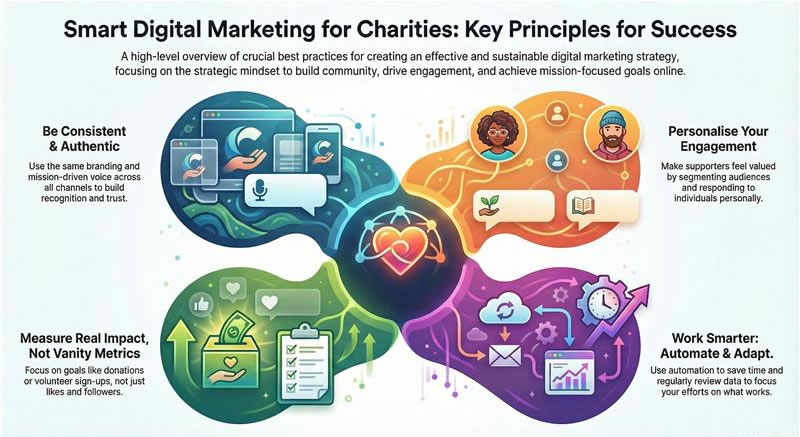
Best Practices and Final Tips for Digital Marketing Success
Bringing all these elements together, let’s highlight some overarching best practices to ensure your digital marketing efforts actually pay off for your charity. These are guiding principles that will keep your strategy effective and sustainable.
1. Consistency is Key – Consistency in both frequency and branding. We touched on posting regularly and emailing on a schedule; this keeps your audience warm. Equally important is consistent branding – use the same charity name (no abbreviations one day and full name the next), same logo, colours, and tone of voice across all channels. This repetition builds recognition.
For example, someone sees your tweet, later an email, and later a flyer – if they all look and feel like they’re from the same source, that reinforces memory and trust. Make a simple style guide (even one page: listing your colour hex codes, fonts, and a sentence on voice like “We speak in a friendly, hopeful tone, and avoid jargon”). This helps if multiple people post on behalf of the charity as well.
2. Personalisation and Segmentation – Modern digital marketing is moving away from one-size-fits-all blasts. Use the data you have to tailor communications. Segment your email list (even if just separating volunteers vs. donors, or local supporters vs. international). Address people by name. On social media, if someone regularly engages, consider sending them a personal thank you or shout-out.
People are more likely to respond when they feel seen as individuals, not just part of a mass. A small charity can excel here because you can know many of your supporters personally. Carry that personal touch into digital: e.g., a quick “Hi John, noticed you signed our petition – thank you!” DM or email can make someone’s day and convert them into a long-term advocate.
3. Automate to Amplify (but don’t sound like a robot) – Automation tools are your friend when understaffed. Schedule posts, set auto-responders (“Thank you for contacting us, we’ll reply in 24h”), use email drip sequences, etc., to maintain activity without live input 24/7. However, always review automated content to ensure it aligns with real-world conditions (pausing scheduled posts if unexpected events happen that make them inappropriate, for example). And when someone replies or asks a question, jump in personally – people will tell if they only ever get canned responses. So, automate routine tasks to free you up for genuine engagement.
4. Monitor and Respond – Digital marketing isn’t “set and forget”. Make a habit of monitoring your channels daily (or assign a rotation if you have a team). Respond to comments, messages, and emails promptly – ideally within 24 hours. This responsiveness not only aids engagement, but also prevents negative experiences from festering. If someone leaves a critique or a concern, address it openly and politely – showing that you care about feedback. On the positive side, if someone praises you or shares your content, acknowledge it (even a simple “Like” or “Thank you for sharing!” reply).
These small interactions build relationships. Also monitor what’s being said about your charity or relevant topics online. Set up Google Alerts for your charity name and key issues (e.g., “youth homelessness [your city]”) – it will email you when new mentions pop up on the web. That way you can catch media coverage, blog mentions, etc., and respond or share them. On Twitter, regularly search for your charity name and common misspellings – you might find people talking about you or asking for help, and you can jump in.
5. Evaluate and Adapt – At least every few months, review what’s working and what isn’t. Look at metrics: Which emails had the highest open or click rates? Which social posts got the most engagement? Which website pages are most visited? And ultimately, which channels are driving the actions you care about (donations, sign-ups, event attendance)? Perhaps you expected Instagram to be big for volunteers, but you find LinkedIn actually brought more via a single post in a professional group – that insight could shift your resource allocation.
Maybe you spent a lot of time on a lengthy report PDF that hardly anyone downloaded, whereas short video stories you posted got lots of traction – so next time, invest more in the format that works. Don’t be afraid to pivot strategies. Digital landscapes change quickly (remember how fast TikTok rose, or how Facebook algorithm changes can drop reach overnight). Stay informed about trends but stay grounded in your mission – every new shiny platform isn’t necessarily right for you. It’s better to do a few things well than spread thin on every new app. Regular evaluation will inform these decisions.
6. Collaborate and Cross-Promote – You’re not alone in the digital space. Team up with peer organisations, especially those with complementary missions (e.g., a food bank and a housing charity can co-host a campaign on poverty). Cross-promote each other on social media or email – “Partner Spotlight: Check out [Other Charity], doing great work in our community.” This not only helps each other grow audiences but also shows goodwill.
For Islamic charities, for instance, collaborating on multi-charity appeals during Ramadan (each focusing on a different aspect like water, health, education but presenting a united message of giving) can inspire larger collective donations. Globally, #GivingTuesday is a moment where many charities coordinate messaging – participating in those larger movements can boost your visibility.
Also amplify voices of your beneficiaries (with permission) and supporters. User-generated content is powerful – maybe run a campaign asking supporters to share a photo or a statement “why I support [CharityName]” and feature those. It makes your marketing less about you speaking and more about the community around you.
7. Stay True to Your Mission and Values – In the quest to be trendy or get clicks, never compromise on your core values. Authenticity is crucial. If your charity’s ethos is about dignity and empowerment, make sure your marketing reflects that (no pity-inducing images or language that undermines the people you serve). If you are faith-based, ensure your content aligns with those principles (as we discussed with Islamic values, for example, avoid anything that would alienate that base, and positively incorporate faith where appropriate).
Remember, marketing is a means to an end – the end is furthering your charitable mission. So always ask, “Does this campaign/post/action align with our mission and help move it forward?” If an idea feels off or purely gimmicky, it likely won’t resonate with your supporters anyway. But when you market from the heart of your mission, you’ll attract like-minded supporters naturally.
8. Keep Learning and Innovating – Digital marketing is dynamic. What works today may not tomorrow. Encourage a culture of learning in your team (even if it’s just you!): attend free webinars (Google, Facebook, Charity Digital, and others frequently host them), follow non-profit marketing blogs or social accounts for tips, maybe join a network of charity communicators (there are Facebook groups and LinkedIn groups where people share advice).
Small charities can be very innovative out of necessity – you might discover a completely new way to engage people that others haven’t tried. Don’t be scared to experiment on a small scale. And if something flops, it’s okay – learn from it and move on.
9. Measure Impact, Not Vanity Metrics – It’s easy to get caught in chasing followers or likes. While those can be indicators, always tie back to real impact. 100 engaged email subscribers who donate or volunteer are better than 1,000 Instagram followers who ignore your posts. So when you set goals, consider impact metrics: e.g., “increase online donations by 20%” or “recruit 50 volunteers via digital channels this year” rather than “get 500 more Facebook likes”. This will keep your marketing focused on your true objectives (which are likely fundraising, volunteer recruitment, service outreach, awareness of your cause, etc.).
10. Take Care of Your Team (and Yourself) – Digital marketing can be 24/7, but burnout helps no one. It’s better to do fewer things well than try to do everything and exhaust yourself. Schedule breaks, rotate duties if you have a team, use tools to pause notifications outside work hours (nothing is so urgent it can’t wait until morning, usually). Also, the internet can unfortunately attract trolls or negative comments. Have a policy for dealing with that (delete or hide inappropriate comments, don’t engage in flame wars, etc.) and support each other – it can be distressing to face online criticism, so debrief and keep perspective.
Celebrate your successes, no matter how small – got 10 new subscribers? Fantastic! Raised £100 from a Facebook post? That’s a meal for 20 people maybe – real impact. Recognise those wins to keep motivation up. By adhering to these best practices, you create a strong foundation that makes all the tactics – email, social, ads, content – more effective. Digital marketing is as much about mindset and process as it is about tools and platforms. Stay strategic, stay compassionate, and you will see your online community and impact grow steadily over time.
Tools and Platforms for non-profit Digital Marketing
Below is a comprehensive list of external websites, resources, and tech tools that were mentioned in the research, plus a few additional relevant tools for charities.
| Tool / Platform | Category | Link | Purpose | Costs |
| Mailchimp | Email Marketing | mailchimp.com | Email marketing platform | Free plan (basic); Paid tiers |
| Sendinblue (Brevo) | Email Marketing | brevo.com | Email & SMS marketing platform | Free plan; Paid plans |
| Constant Contact | Email Marketing | constantcontact.com | Email marketing & events platform | Free trial; Paid plans |
| Hootsuite | Social Media Management | hootsuite.com | Social media management dashboard | Free (limited); Paid (75% non-profit off) |
| Buffer | Social Media Management | buffer.com | Social media scheduling tool | Free (3 channels); Paid (50% off non-profit) |
| Sprout Social | Social Media Management | sproutsocial.com | Advanced social media management | Free trial; Paid (40% off non-profit) |
| Loomly | Social Media Management | loomly.com | Social media content planning | Free trial; Paid (50% off non-profit) |
| Later | Social Media Management | later.com | Instagram & TikTok scheduling tool | Free (limited); Paid (50% off non-profit) |
| SocialPilot | Social Media Management | socialpilot.co | Affordable social scheduling tool | Free trial; Paid (15–20% off non-profit) |
| SocialBee | Social Media Management | socialbee.io | Social content automation tool | Free trial; Paid |
| Agorapulse | Social Media Management | agorapulse.com | Social media management with inbox | Free (limited); Paid (20% non-profit off) |
| ChatGPT | Content & Copywriting | openai.com | AI content writing chatbot | Free (basic); Paid (Plus subscription) |
| Grammarly | Content & Copywriting | grammarly.com | Grammar & spell check assistant | Free basic; Paid Premium |
| BuzzSumo | Content & Copywriting | buzzsumo.com | Trending content research tool | Free (limited); Paid (20–30% off non-profit) |
| Canva | Graphic Design | canva.com | Graphic design tool (templates) | Free; Pro free for non-profits |
| Google Analytics | SEO & Analytics | analytics.google.com | Website traffic analytics service | Free (Standard); Paid (GA360) |
| Google Search Console | SEO & Analytics | search.google.com/search-console | Website SEO performance monitor | Free |
| Looker Studio (Data Studio) | SEO & Analytics | lookerstudio.google.com | Data visualization dashboard | Free |
| Ahrefs | SEO & Analytics | ahrefs.com | SEO & backlink analysis tool | Free (limited); Paid (non-profit discounts) |
| SEMrush | SEO & Analytics | semrush.com | SEO & marketing analytics suite | Free (limited); Paid (non-profit discounts) |
| Ubersuggest | SEO & Analytics | ubersuggest.com | SEO keyword research tool | Free (limited); Paid |
| Screaming Frog | SEO & Analytics | screamingfrog.co.uk | Website crawler for SEO audits | Free (500 URLs); Paid |
| Sitebulb | SEO & Analytics | sitebulb.com | Website SEO auditing tool | Free (limited); Paid |
| Web.dev | SEO & Analytics | web.dev | Website performance & SEO audit | Free |
| Yoast SEO (WordPress) | SEO & Analytics | yoast.com | WordPress SEO optimization plugin | Free; Paid Premium |
| Wix SEO Wiz | SEO & Analytics | wix.com | Built-in SEO guide for Wix | Free (included with Wix) |
| Metatag (Drupal) | SEO & Analytics | drupal.org | Drupal SEO meta tag module | Free (open source) |
| ClickUp | Project Management | clickup.com | Project & task management platform | Free plan; Paid (non-profit discounts) |
| Asana | Project Management | asana.com | Team project tracking tool | Free (basic); Paid (non-profit pricing) |
| Trello | Project Management | trello.com | Kanban board task management | Free; Paid (non-profit discounts) |
| Slack | Project Management | slack.com | Team communication messaging app | Free; Paid (non-profit discounts) |
| Basecamp | Project Management | basecamp.com | Team project collaboration suite | Paid (50% non-profit off) |
| monday.com | Project Management | monday.com | Visual project management tool | Free trial; Paid (70% non-profit off) |
| Google Ad Grants | Search Advertising | google.com/grants | Free Google Ads for non-profits | Free ($10k/month ad credit) |
| Meta Ads Manager | Social Advertising | facebook.com/business | Facebook & Instagram advertising | Platform free; Paid ads (bid-based) |
| Donately | Fundraising & Donor Management | donately.com | Online donation pages platform | No subscription; ~0.5% per donation |
| Donorbox | Fundraising & Donor Management | donorbox.org | Donation form & fundraising tool | Free platform; 1.5% fee on donations |
| Bloomerang | Fundraising & Donor Management | bloomerang.com | Donor CRM & fundraising software | Paid (from ~$125/mo; non-profit discounts) |
| Kindful | Fundraising & Donor Management | kindful.com | Donor management CRM (Bloomerang) | Paid (from ~$119/mo; non-profit discounts) |
| Salesforce (non-profit Cloud) | Fundraising & Donor Management | salesforce.org | Enterprise CRM for non-profits | Free (10 licenses); Paid (non-profit rates) |
| Eventbrite | Fundraising & Donor Management | eventbrite.com | Event registration and ticketing | Free for free events; Fees on paid tickets |
| JustGiving | Fundraising & Donor Management | justgiving.com | Online fundraising & crowdfunding | No monthly fee; 2–5% platform fee |
Conclusion
Digital marketing for small charities is about staying true to your core mission while embracing modern tools. You don’t need the budget of a big NGO to make a big splash online; you need creativity, consistency, and genuine engagement. Remember to focus on the fundamentals: a clear message, a user-friendly website, compelling stories, and frequent communication that shows supporters the difference they are making.
Learn from leading organisations, but also trust your unique approach – your cause has its own story and audience. Infuse your passion into every tweet, email, and video, and people will feel it. Don’t chase every trend; do what aligns with your values and resonates with your community. Digital trends come and go, but authenticity and trust will keep supporters by your side. Finally, keep the faith! Building an online presence takes time, especially when resources are thin. But each new follower, each share, each online donation is a step forward. Celebrate those small wins and keep experimenting.
By implementing the practices and using the tools outlined in this guide, your charity can create a sustainable digital marketing strategy that amplifies your voice and furthers your mission, all while being feasible for a small team. In the digital world, even a little organisation can have a loud voice. Your charity’s work is important – digital marketing is simply the amplifier to let more of the world know and care about it. Good luck, and thank you for making a difference!
Fundraise 20% more with AMCM.Agency
Building an affiliate fundraising campaign isn’t just about setting up tracking and waiting for partners to join. Success comes from knowing where to look, who to contact, and how to build lasting relationships with affiliates and influencers that align with your cause. That’s where AMCM.Agency comes in.
We are specialists in affiliate fundraising for charities. With over 20 years of experience in affiliate marketing, our team has the knowledge and tools to cut through the noise and find the partners who really matter. Unlike most charities starting from scratch, we already maintain a bank of over 10,000 publishers – bloggers, cashback platforms, coupon sites, and content creators – who can give your campaign the kickstart it needs.
By partnering with AMCM.Agency, your charity benefits from:
- Immediate access to pre-vetted affiliates and influencers who understand cause-driven fundraising.
- Professional campaign setup and management on the right networks and platforms.
- Hands-on recruitment and outreach to align you with publishers who genuinely connect with your mission.
- Ongoing optimisation so your campaign isn’t just launched, but continues to grow and deliver year after year.
Our goal is simple: to help your organisation raise at least 20% more in donations by building a sustainable, performance-based affiliate fundraising program. We know the sector, we know the tools, and we know the partners who can make it happen.
If you’re ready to turn your affiliate fundraising ambitions into real results, let AMCM. Agency launches and manages your campaign. We’ll connect you with the right affiliates, negotiate the right deals, and ensure your program is set up for long-term success.
👉 If your charity is ready to increase online donations through affiliate fundraising, download AMCM Agency’s media kit here or contact AMCM Agency today to discuss how we can help.


